
Most mobile apps fail. Not because they were built badly, not because the technology was wrong, but because they were built around what the developers assumed users would want rather than what users actually needed. The app launches, gets a handful of downloads, earns three-star reviews that mention “confusing” and “hard to navigate,” and quietly stops being opened. The business has spent the development budget and has nothing to show for it that is generating revenue or serving its purpose.
User-centered design is the discipline that prevents that outcome. It is the process of building every decision in an app’s design around real research into how real users think, what they are trying to accomplish, and where existing solutions are failing them. Every custom mobile app built by a serious development team starts with UCD work before a single screen is designed. Skipping it does not make the project cheaper. It makes it far more likely to produce a result that needs to be rebuilt.
This post explains what user-centered design actually involves, why it determines whether an app succeeds or fails, and what it looks like when it is done well versus when it is skipped in the name of speed or budget.
What Is Actually at Stake
The numbers around app failure and user abandonment are stark enough that they deserve to lead this conversation rather than appear as supporting evidence at the end.
The dominant reason users abandon apps is not technical failure. It is friction. The app is too complicated to learn. The navigation does not match how users think. Key actions require too many steps. The interface does not behave the way experience with other apps has led users to expect. All of these are design failures, and all of them are discoverable before launch if the right research and testing process is followed.
What Happens When User-Centered Design Is Skipped
The consequences of launching without a UCD process are predictable and consistent. They show up in the same ways across industries and app types, and they all cost more to fix after launch than they would have cost to prevent during design.
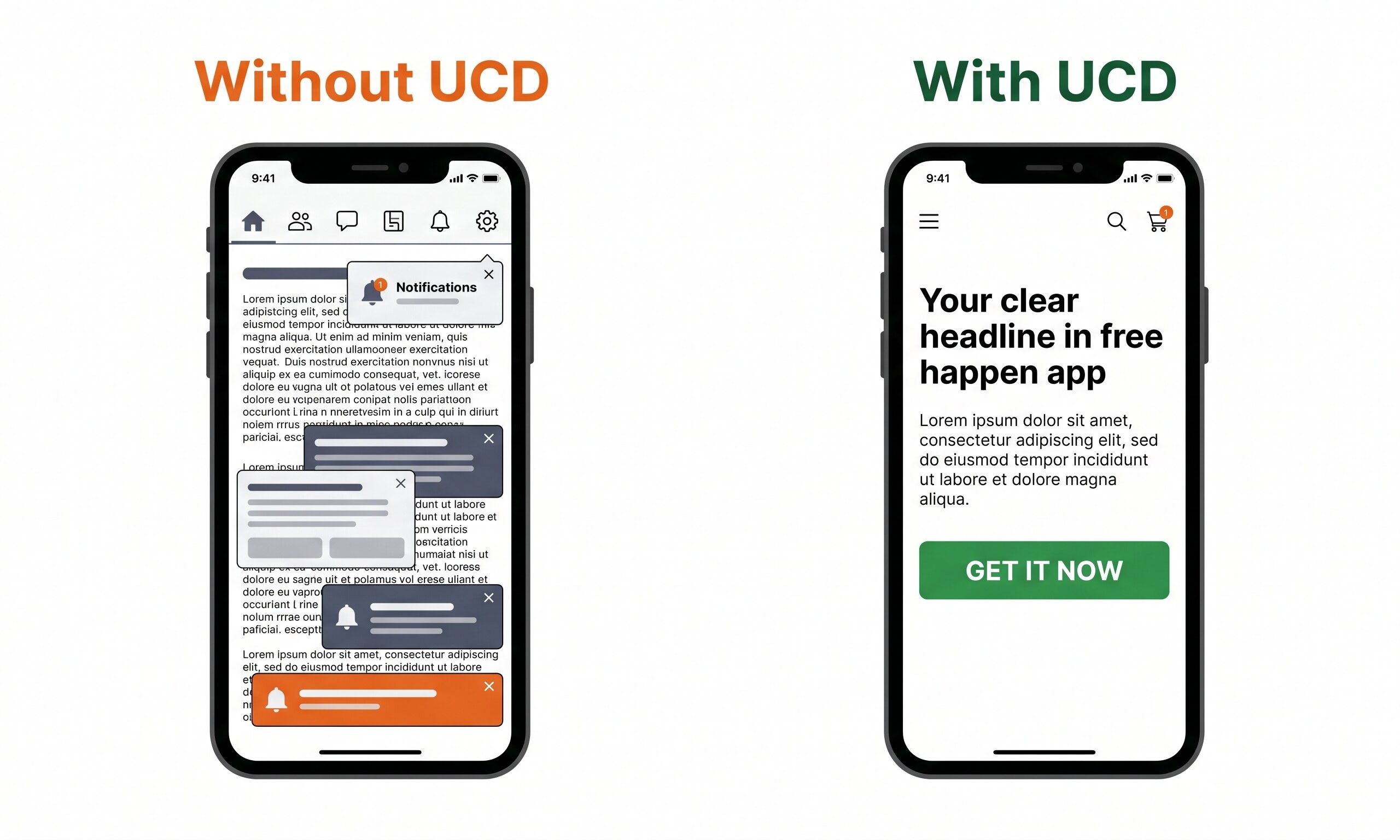
The difference between an app users open daily and one they delete after a single session is rarely about features. It is almost always about how clearly the design reflects how users actually think and what they are trying to do.
What User-Centered Design Actually Involves
UCD is not a single step in the development process. It is a philosophy applied across every stage, from the initial scoping of the app’s purpose through to post-launch iteration based on usage data. Here is how each stage translates into a business outcome.
User research before design begins
This is the foundation of UCD and the step most often skipped under budget pressure. It involves structured research into who the target users are, what they are currently doing to solve the problem your app addresses, what frustrates them about existing solutions, and what a successful outcome looks like from their perspective. Methods include interviews, surveys, competitor app analysis, and behavioral observation. The output is not a report. It is a clear picture of what the app needs to do to be adopted and used, not just downloaded.
Prototyping and usability testing before development
Before the app is built, UCD processes test it. A clickable prototype, ranging from a rough wireframe to a near-finished visual mockup, is put in front of real users and observed. Where do they get confused? What do they tap expecting one thing and get another? What step causes them to stop? Identifying these friction points at the prototype stage costs a fraction of what it costs to fix them in a built, tested, and submitted app. This is the single highest-return investment in the development process.
Designing navigation around user mental models
A user mental model is how a person expects something to work based on their experience with other apps and digital products. People expect the back button to work a certain way. They expect the profile icon to live in a specific corner. They expect a swipe gesture to dismiss something. Apps that align with these mental models feel intuitive immediately. Apps that contradict them feel confusing regardless of how logical the internal structure is. UCD maps the navigation structure to how users think rather than how the app was built.
Accessibility as a design requirement, not an afterthought
Accessibility means designing the app to work for users with visual, hearing, motor, or cognitive disabilities. This includes supporting dynamic text sizing, screen readers, sufficient color contrast, and touch targets large enough to be used reliably. Treating accessibility as a post-launch addition typically requires significant rework. Building it in from the start costs very little extra and meaningfully expands the audience the app serves. In many regulated industries, accessibility is also a legal requirement rather than an optional enhancement.
Post-launch iteration driven by usage data
UCD does not end at launch. User behavior in the live app provides the richest source of design intelligence available: where users drop off, which features go unused, which flows generate support tickets, and which paths lead to the actions the app was built to produce. A team that continues to apply UCD principles post-launch uses this data to prioritize improvements that serve real user needs rather than adding features based on internal assumptions. Apps that compound these improvements consistently outperform static competitors over time.
What the UCD Process Looks Like in Practice
For a business commissioning a custom app, the UCD process should be visible and collaborative rather than happening entirely inside the development team. Here is what each stage looks like from the client’s perspective.
Discovery and research
Structured conversations with your target users or customer base. Understanding their current workflow, their pain points, and what success looks like to them. Competitive app analysis to understand what already exists and where it falls short.
User personas and journey mapping
Synthesizing research into specific user types and the journeys they take through the app to accomplish their goals. These become the reference point for every subsequent design decision: does this serve the user trying to accomplish this task?
Wireframing and information architecture
Mapping out the structure of every screen, the navigation between them, and the hierarchy of content on each page before any visual design begins. This is where the UX foundation is set and the most consequential structural decisions are made.
Prototype testing
A clickable prototype of the core flows is tested with real users. Their behavior is observed and their feedback is collected. Findings are fed back into the design before development begins. This is the highest-return phase of the entire process.
Visual design and build
With structure and usability validated, visual design applies the brand identity and polished interface treatment to the tested wireframes. Development builds from this foundation with far fewer design-change requests mid-build.
Post-launch analytics and iteration
Usage analytics inform a prioritized improvement roadmap. Features that are not being used, flows where users drop off, and actions that generate support requests all become inputs for the next development cycle.
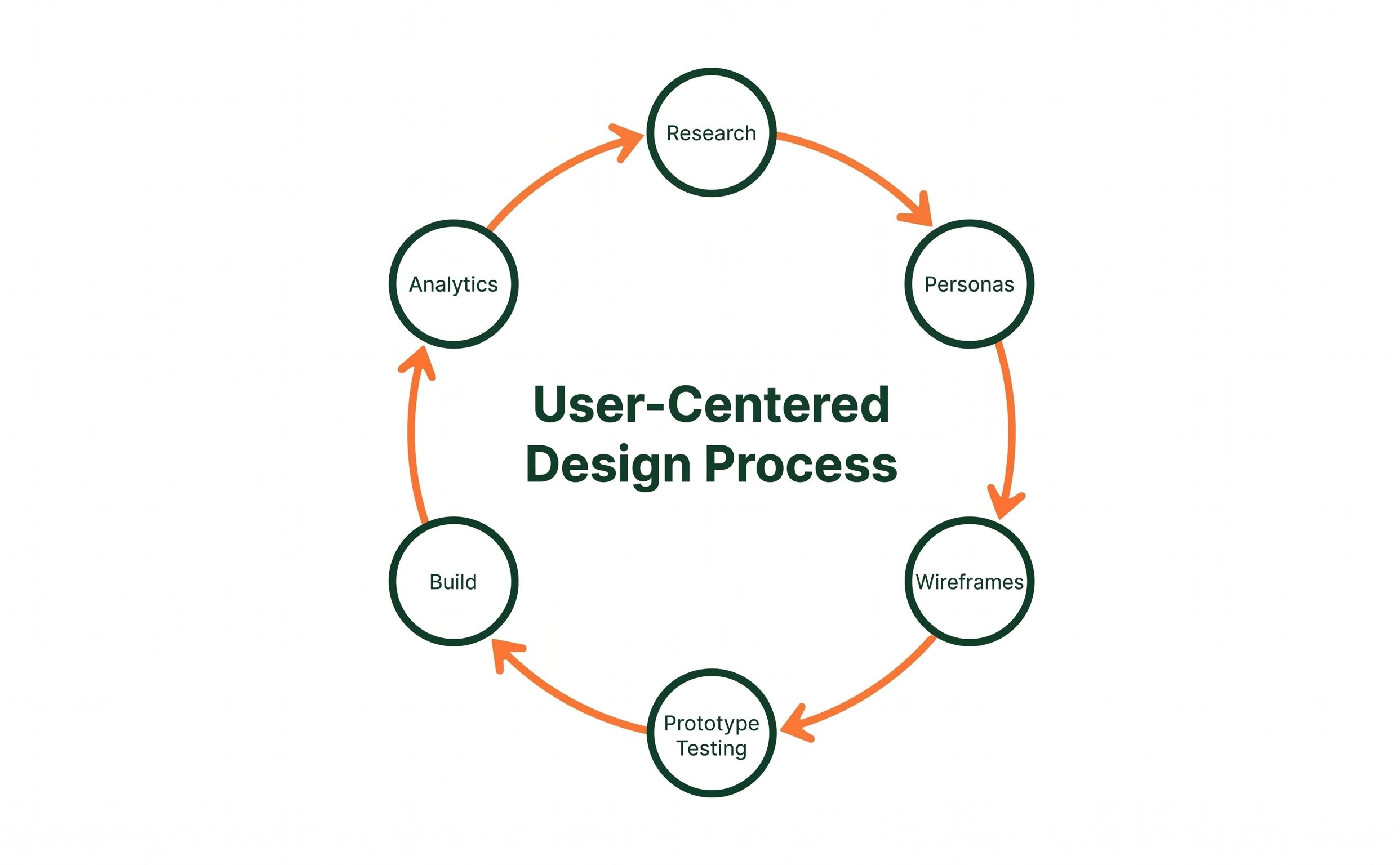
User-centered design is a continuous cycle, not a single phase. The apps that retain users and improve over time are the ones where every release is informed by evidence from the previous one.
The Connection Between UCD and Business Performance
It is worth being direct about why this matters in purely commercial terms, because the design philosophy framing can make UCD sound like a nicety rather than a necessity.
An app with strong user-centered design retains more users, which reduces the cost of growth. Acquiring a new user is expensive. Keeping a user engaged costs almost nothing once the app is built. Every percentage point improvement in 30-day or 90-day retention is compounding improvement in the app’s long-term value without additional acquisition spend.
An app with strong UCD converts more users to the action it was built to produce, whether that is a subscription, a booking, a purchase, or a service inquiry. Research-backed estimates place conversion improvements from UCD-driven redesigns consistently in the 30 to 50% range. For an app generating revenue, that improvement flows directly to the bottom line.
The most expensive mistake in mobile app development is not choosing the wrong technology stack or missing a launch deadline. It is building an app that users do not find worth opening a second time. User-centered design is the only systematic process for reducing that risk before it becomes a sunk cost.
What to Ask a Development Agency About Their UCD Process
If you are evaluating development partners for a mobile app project, the questions below will quickly distinguish teams that treat UCD as a genuine process from those that use it as marketing language without a corresponding methodology.
- What user research do you conduct before starting design? Can you describe the methods?
- Do you create and test prototypes before development begins, and do clients see those test results?
- How do you decide what features to prioritize and which to leave for a later version?
- Can you show examples of how user testing feedback changed a design decision on a previous project?
- What analytics do you set up at launch to track user behavior, and how do those feed into post-launch improvements?
An agency that cannot answer these questions specifically has likely not embedded UCD as a genuine part of its process. The answers do not need to be elaborate, but they should be concrete and specific rather than generic statements about “putting users first.”
Frequently Asked Questions
How much does user-centered design add to the cost of an app project?
In a well-run project, UCD work typically represents 15 to 25% of the total project budget and saves far more than that in prevented rework. The research, wireframing, and prototype testing phases that constitute the core UCD process are investments that reduce the cost and risk of every subsequent phase. Teams that skip this work to reduce upfront cost routinely spend more on post-launch fixes than the UCD process would have cost. The more accurate question is not what UCD adds to the project but what skipping it tends to cost.
Can UCD be applied to an app that has already been built?
Yes, and it is the most common path for apps that have launched but are underperforming. A UCD audit of an existing app starts with usage analytics to identify where users are dropping off, followed by usability testing with real users to understand why. The findings produce a prioritized list of design changes, tested against user expectations before being built. Applying UCD to an existing app is more expensive than building it in from the start, but it consistently produces measurable improvements in retention and conversion for apps that are struggling to hold users.
Is user-centered design different from UX design?
UCD is the philosophy and process framework. UX (user experience) design is the practice that applies it. A UX designer working within a user-centered design process conducts research, creates personas, maps user journeys, builds and tests wireframes, and iterates based on feedback. UX design done without a UCD framework tends to be more intuition-driven and less research-validated. The term UX design is used broadly and does not always imply a rigorous UCD methodology, which is why asking specifically about the process is more useful than asking whether a team does UX design.
How many users do you need for meaningful usability testing?
Research by usability pioneer Jakob Nielsen established that five users in a moderated usability test will identify approximately 85% of a design’s usability problems. More users adds diminishing returns for qualitative testing, though quantitative studies that measure task completion rates and conversion flows require larger sample sizes. For most small to mid-sized business app projects, five to eight participants per round of usability testing produces enough signal to make confident design decisions. This is a small investment relative to the cost of building a feature set that does not work for real users.
Does user-centered design apply to internal business apps, not just consumer-facing ones?
Yes, and the argument for UCD in internal apps is equally strong. An internal tool used by employees daily that is frustrating and slow to use creates measurable productivity loss, increases training time for new staff, and generates ongoing support overhead. The users of an internal app are often reluctant to complain about poor design because the tool was commissioned by management, which means usability problems can persist for years without being formally raised. Applying UCD to internal app projects produces tools that staff actually use effectively, which is the entire point of building them.
Building an App That People Actually Use Starts Before Any Code Is Written
Every app we build at The Valley List starts with understanding your users before we design a single screen. If you have an app idea or an existing app that is not performing, let’s talk through what a user-centered approach would look like for your specific project.
Let’s Talk About Your App