
If you are considering commissioning a mobile app for your business, one of the most useful things you can do before your first conversation with a developer is understand how the process actually works. Not the technical details, but the sequence of decisions, deliverables, and milestones that take an idea from a conversation to something your customers can download and use. Knowing what to expect at each stage makes you a better client, reduces surprises, and helps you spot whether a development partner is following a sound process or cutting corners.
Mobile apps are developed in distinct phases, each building on the last. A professional app development team will walk you through every stage, but the overview below gives you the foundation to understand what is happening, why each phase matters, and what your involvement looks like throughout.
The Three Types of Mobile Apps (And Why It Matters Which One You Build)
Before getting into the development process, it helps to understand that not all mobile apps are built the same way. There are three distinct approaches, and the one your project uses affects your budget, your timeline, your app’s performance, and what it can do.
Native apps
Best for: performance-critical and feature-rich appsBuilt specifically for one platform, iOS or Android, using the platform’s own development tools. Native apps deliver the best performance, the deepest access to device hardware (camera, GPS, Bluetooth, biometrics), and the most polished user experience. They are also the most expensive to build, particularly if you need both platforms, since they require separate development efforts.
Cross-platform apps
Best for: reaching iOS and Android from one codebaseBuilt using frameworks like Flutter or React Native, which produce a single codebase that runs on both iOS and Android. Performance is close to native for most standard app types. Development time and cost are significantly lower than building two separate native apps. The right choice for the majority of business apps that do not require deep hardware integration.
Progressive web apps
Best for: lightweight, content-driven experiencesWeb-based applications accessed through a browser that behave like apps: they can be added to a home screen, work partially offline, and send push notifications. No app store submission required. Significantly cheaper and faster to build. Best suited to content delivery, simple tools, and businesses that want an app-like experience without the cost or distribution complexity of native development.
The development approach you choose is one of the first and most consequential decisions in any app project. The right answer depends on your audience, your budget, the features you need, and which platforms your users are on. A development partner worth working with will explain this tradeoff clearly before recommending a direction, not default to the most expensive option.
The Mobile App Development Process: Stage by Stage
The following phases represent how a well-run custom app project progresses from initial concept to a live, maintained product. The names and exact boundaries between stages vary between agencies, but the core sequence is consistent across professional development teams.
Defining what the app will do and for whom
The project starts with structured discovery work: understanding your business goals, your target users, the problem the app solves, and the specific features it needs at launch. This phase produces a detailed scope document that defines every screen, every user action, and every integration the app requires. A well-defined scope is the single most important factor in keeping a project on budget and on time. Vague scope is the root cause of the majority of cost overruns and timeline delays in app development.
Mapping out every screen and user flow
Before any visual design or code is written, the user experience is mapped in detail. Wireframes are structural blueprints for each screen: they show what content appears, where it sits, and how the user moves between screens to accomplish their goals. This stage is where decisions about navigation structure, information hierarchy, and user flows are made and tested. Problems caught here cost a fraction of what they cost to fix after development has begun. This phase is covered in depth in our post on why user-centered design matters in mobile app development.
Applying visual design to the validated structure
With the structure established and tested, the visual design is applied. This is where your brand identity, color palette, typography, and visual language are translated into detailed screen designs. A clickable prototype is typically produced at this stage, a high-fidelity version of the app that looks and feels close to the finished product but is not yet built in code. This prototype is reviewed with you and ideally tested with real users before development begins, ensuring the visual design and interaction details are approved before the most expensive phase of the project starts.
Building the front end, back end, and integrations
Development is where the app is built in code. It has two distinct components that happen in parallel. Front-end development builds the interface: the screens, animations, navigation, and all the visual elements users interact with. Back-end development builds the server-side infrastructure: the database, the API connections, the authentication system, and any logic that happens behind the scenes. Integrations with third-party services, such as payment processors, mapping APIs, notification systems, or your existing business software, are built and connected during this phase. Development is the longest and most resource-intensive phase of the project.
Finding and fixing problems before users do
Before the app is submitted to the App Store or Google Play, it goes through structured testing. This includes functional testing (does every feature work as specified), usability testing (do real users find it intuitive), performance testing (does it load quickly and run smoothly under typical and peak load), compatibility testing (does it work correctly across the range of devices and OS versions it needs to support), and security testing (are there vulnerabilities that could expose user data). QA is not optional. Apps that skip structured testing before submission regularly fail App Store review and generate poor early reviews that are difficult to recover from.
Navigating the review and approval process
Both Apple’s App Store and Google Play require apps to pass a review process before they are published. Apple’s review is more rigorous: it checks for compliance with Human Interface Guidelines, accurate metadata, privacy policy completeness, and correct use of APIs. Review times vary from one to three days for routine submissions to longer for first-time apps or complex feature sets. Google Play’s review is typically faster. An experienced development team will have built the app to platform guidelines from the start, significantly reducing the risk of rejection. Rejection is common for first submissions and is not a crisis, but it does delay launch.
Keeping the app working and improving over time
Launch is not the end of the project. Operating system updates from Apple and Google regularly introduce changes that require corresponding updates in your app to maintain compatibility and performance. User feedback from the first weeks of real-world use generates a prioritized list of improvements for the next release. Analytics from actual usage patterns reveal which features are being used, which are being ignored, and where users are dropping off. A maintained app compounds its value over time. An unmaintained one degrades.
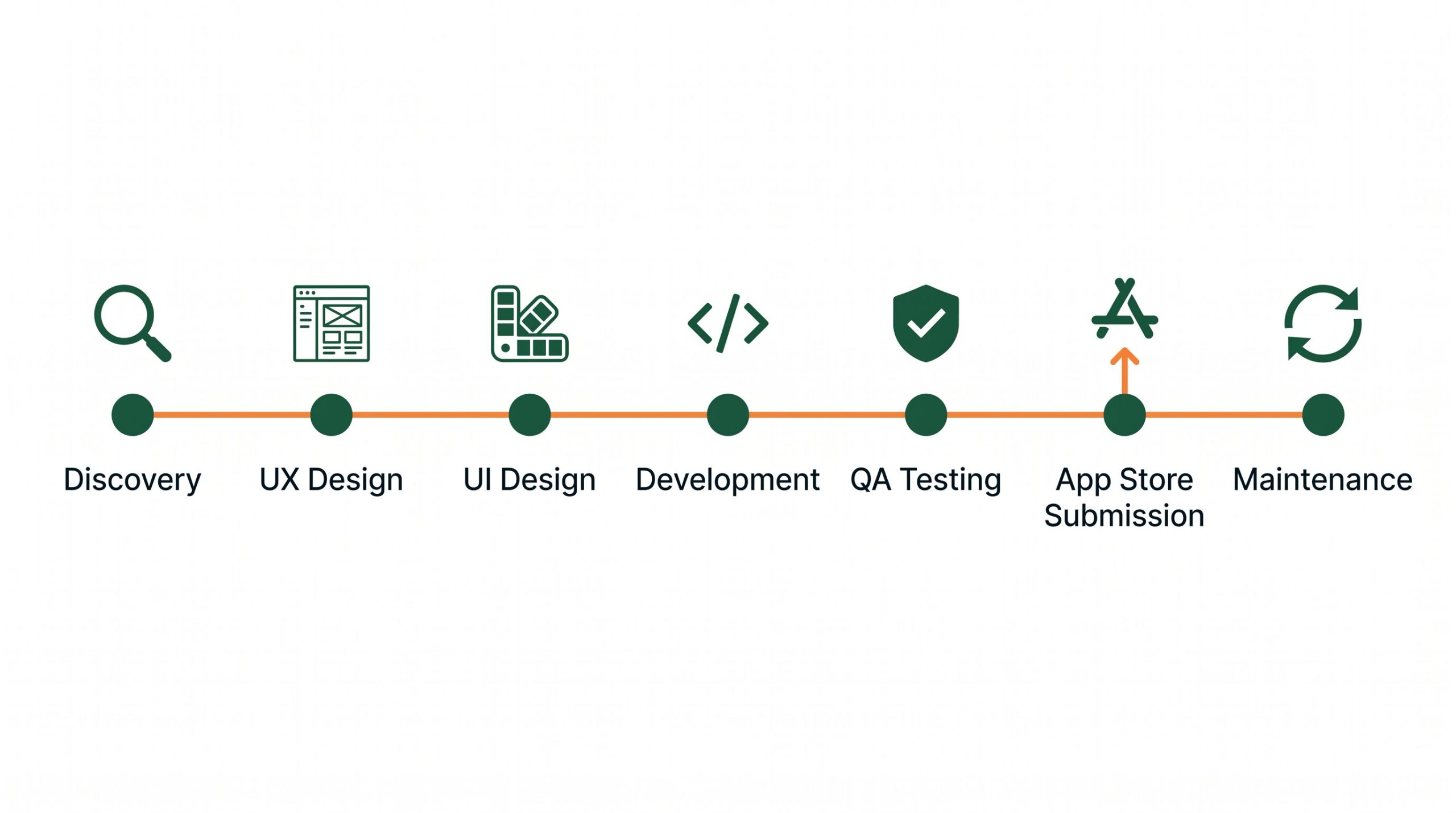
A well-run app project follows a clear sequence of stages, each one building on the last. Understanding this process helps you know what to expect, when your input is needed, and what each phase is producing.
Who Is on a Mobile App Development Team
Understanding who does what in a development team helps you know who to direct questions to at each stage and what each role is responsible for delivering.
Project Manager
Your primary point of contact throughout the project. Responsible for timeline, communication, scope management, and ensuring the development team has everything they need to stay on track.
UX Designer
Leads user research, creates wireframes, maps user flows, and conducts usability testing. Responsible for ensuring the app is structured around how users actually think and behave.
UI Designer
Applies visual design to the UX structure. Creates the detailed screen designs, component library, and high-fidelity prototype. Responsible for how the app looks and the visual quality of every interaction.
Front-End Developer
Builds the interface the user sees and interacts with: screens, navigation, animations, and the visual layer of the app. Works directly from the UI designer’s specifications.
Back-End Developer
Builds the server-side infrastructure: database, APIs, authentication, business logic, and third-party integrations. Responsible for everything that happens behind the scenes.
QA Engineer
Tests the built app systematically across devices, OS versions, and use cases. Identifies bugs, performance issues, and edge cases before they reach real users or the app store review team.
On smaller projects, some of these roles overlap. A developer may handle both front-end and back-end work. A designer may handle both UX and UI. What matters is that each function is covered by someone with genuine expertise in it, not that each function has a dedicated full-time person.
How Long Does It Take and What Does It Cost
These are the two questions every business owner asks early, and the honest answer to both is: it depends significantly on scope. The following ranges reflect typical timelines and costs for professionally built apps at different complexity levels.
| App Complexity | Typical Examples | Timeline | Cost Range |
|---|---|---|---|
| Simple | Booking tool, directory app, basic loyalty program, informational app with a few screens | 2 to 4 months | $15,000 to $40,000 |
| Medium | E-commerce app, service marketplace, app with user accounts, payment processing, and third-party integrations | 4 to 8 months | $40,000 to $100,000 |
| Complex | On-demand platform, real-time features (live tracking, chat), custom backend infrastructure, multi-role user system | 8 to 18 months | $100,000 and above |
These ranges assume a professional development team building a properly scoped, tested, and submitted app. Significantly lower quotes for equivalent scope typically reflect underfunded QA, offshore development with high revision risk, or a scope that has been narrowed in ways that will create problems post-launch. The cheapest initial quote for an app project is rarely the lowest total cost.
The most effective way to reduce cost without reducing quality is to narrow scope deliberately. A Minimum Viable Product (MVP) approach focuses the first version of the app on only the core features that are essential to validate the concept. Launching an MVP, learning from real user behavior, and iterating from a live product is consistently more effective than building a fully featured app based on assumptions before anyone has used it.

A well-run development process keeps the client involved at every decision point, not just at the beginning and the end. Regular reviews at each phase prevent expensive surprises and produce a better final product.
What Your Role Looks Like as the Client
A common misconception about commissioning an app is that once you hand over the brief and the budget, you step back and receive a finished product weeks later. In a professional development process, the client is involved and consulted at several critical points throughout.
Your input is most valuable during discovery, where your knowledge of your business and your customers shapes the scope. You will review and approve wireframes before visual design begins, and visual designs before development begins. You will test the prototype before it is built in code. You will conduct acceptance testing of the built app before submission. At each of these points, feedback from you prevents the project from going in the wrong direction at a stage where correction is still affordable.
The amount of your time required is not excessive, typically a few structured review sessions at key milestones, but those sessions matter enormously. An agency that does not schedule formal client reviews at these stages is either working faster than they should or has a process that does not account for the fact that you know your users and your business better than they do.
Frequently Asked Questions
Do I need a separate app for iPhone and Android, or can one app cover both?
You do not necessarily need two separate builds. Cross-platform frameworks like Flutter and React Native produce a single codebase that runs on both iOS and Android, covering both platforms without the cost of two independent native builds. For most standard business apps, cross-platform performance is now close enough to native that users cannot tell the difference. The cases where separate native builds are genuinely necessary are apps requiring deep hardware integration, extremely high-performance animations, or immediate adoption of platform-specific features the day they are released by Apple or Google.
What is an MVP and should I start with one?
An MVP, Minimum Viable Product, is the simplest version of your app that delivers its core value to users. It includes only the features that are essential to the app’s primary purpose, with everything else deferred to future versions. Starting with an MVP has two main advantages: it gets something in front of real users sooner, so you can learn from actual behavior rather than assumptions, and it reduces the risk of spending a large budget building features that turn out not to be needed. Most apps that fail do so because they were over-built based on assumptions before any real-world validation. An MVP-first approach is the lower-risk path for most new app projects.
What ongoing costs should I plan for after launch?
The main ongoing costs are hosting and infrastructure (your app’s backend runs on servers that have a monthly cost, typically $50 to $500 per month depending on scale), app store developer accounts ($99 per year for Apple, $25 one-time for Google), maintenance updates when OS changes require compatibility work, and any new feature development you commission based on user feedback. The total ongoing cost for a small to medium business app is typically a few hundred to a few thousand dollars per month, depending heavily on backend complexity and how actively you are iterating on the product.
Can I update my app after it is live?
Yes, and you should plan to. Apps are not static products. Both Apple and Google regularly update their operating systems in ways that require corresponding updates in apps to maintain compatibility. Beyond maintenance updates, most successful apps release new versions on a regular schedule, adding features based on user feedback, fixing issues surfaced by real-world usage, and improving areas of the experience that analytics show are causing friction. Updates go through the same review process as the original submission, though they are typically reviewed faster for established apps with a clean history.
What information should I have ready before talking to a development agency?
The more clearly you can describe the problem the app solves and who it solves it for, the more useful your first conversation will be. You do not need technical specifications. You need a clear picture of your target user, the core action you want them to take in the app, any existing systems (website, CRM, payment processor) the app needs to connect to, and your approximate budget range and desired timeline. Having examples of apps you admire, whether competitors or apps from other industries whose experience feels right, is also genuinely helpful for a design team trying to understand your expectations.
Ready to Turn Your App Idea Into Something Real?
We walk every client through the full process before any commitment is made. Tell us what you are trying to build, who it is for, and what it needs to do. We will give you an honest assessment of scope, timeline, and what it will actually take to build it right.
Start the Conversation