
Most hacked websites are not immediately obvious. Attackers do not always deface your homepage or shut the site down. The majority of modern hacks are designed to be invisible to the site owner for as long as possible, while quietly redirecting your visitors, injecting spam content, harvesting customer data, or using your server to send phishing emails. By the time something obvious surfaces, the breach has often been active for weeks or months.
Knowing what to look for, and where to look, is the difference between catching a compromise early and finding out from an angry customer or a Google blacklist notice. Active security monitoring is a core part of what ongoing website maintenance should cover, but even without automated monitoring in place, there are clear signals that something is wrong if you know where to check.
This guide organizes those signals by how you are most likely to discover them, so you can move from suspicion to diagnosis quickly.
Signs You Spot Directly on the Site
These are the most visible indicators, the ones you or a team member might notice while browsing your own site. They range from immediately alarming to subtle enough to be dismissed as a glitch.

Redirect hacks are often invisible to logged-in admins. The site appears normal when you view it, but unrecognized visitors are sent elsewhere. Always check your site while logged out from a device you have not used before.
Signs That Come Through Google and Search Results
Google actively scans billions of pages for malware, phishing content, and spam. It is often the first system to formally flag a compromised site, and the signals it sends are some of the clearest indicators you will receive.
Signs That Come Through Analytics and Traffic Data
Your analytics data tells a story about how your site is being used. Unusual patterns in that data are often the first quantitative signal that something has changed without your knowledge.
Signs That Come Through External Alerts
Sometimes you find out about a hack not from your own monitoring but from someone else who spotted it first. These external alerts should always be taken seriously and investigated immediately.
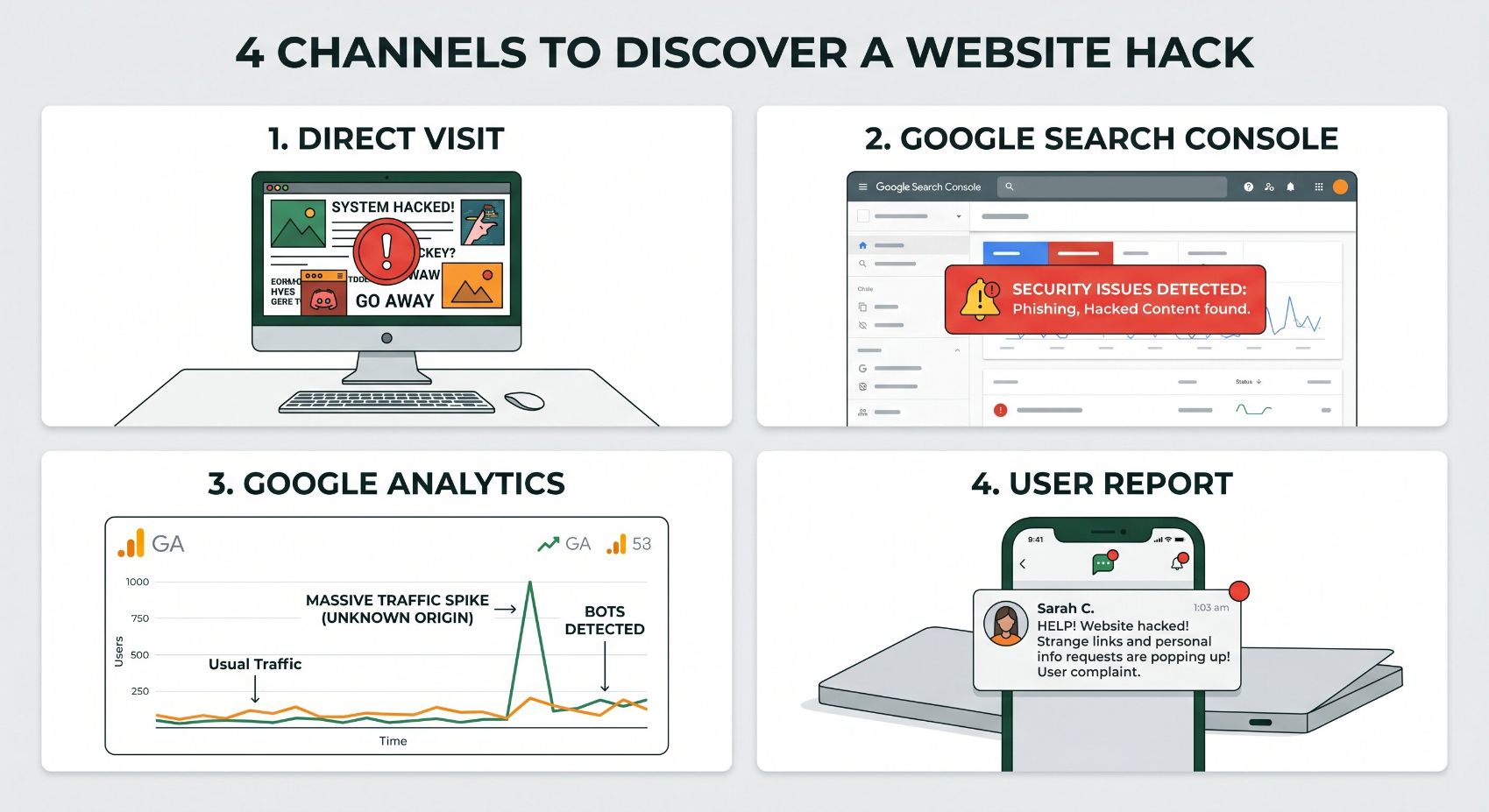
Hacks are rarely discovered through one channel. Knowing all four discovery paths, what you see on the site, what Google flags, what analytics shows, and what external alerts arrive, means you are less likely to miss a breach that is deliberately designed to stay hidden.
What to Do Immediately If You Suspect a Hack
Do not panic and do not immediately take the site down
Taking the site offline is sometimes necessary but should not be the first instinct. Before you do anything, document what you are seeing: take screenshots, note the date and time, and record any error messages or unusual URLs. This information helps with diagnosis and may be needed if the incident has legal or insurance implications.
Check Google Search Console for security alerts
Navigate to the Security Issues section in Search Console. Google will tell you specifically what it has detected and provide example URLs. This is the most authoritative source of information on what the hack has done to your site’s standing with search engines, and it tells you where to focus your cleanup efforts.
Run a malware scan
Tools like Sucuri SiteCheck provide a free external scan that checks your site against known malware signatures, blacklist status, and detects obvious injections. It does not replace a server-level scan but gives you an immediate picture of what is visible from the outside. Your hosting provider may also offer a server-level malware scan through your control panel.
Change all passwords immediately
Change your CMS admin password, your hosting control panel password, your FTP credentials, and your database password. Enable two-factor authentication on every account that supports it. If attackers have credentials, cleaning the malware without changing access details means they can simply re-enter and re-infect.
Restore from a clean backup if one is available
If you have a verified clean backup from before the infection, restoring from it is often the fastest and most reliable path to a clean site. This is only effective if you also identify and close the vulnerability that allowed the breach in the first place, otherwise the same attack vector will be used again. If no clean backup exists, professional malware removal is the next step.
Request a review from Google after cleanup
Once the malware has been removed and the vulnerability closed, submit a review request through Search Console’s Security Issues section. Google will re-evaluate your site and, if it finds the issue resolved, will remove the browser warning and any search result flags. This process typically takes a few days. Do not request a review until you are confident the site is fully clean.
How to Reduce the Risk Going Forward
Most website hacks exploit one of a small number of common vulnerabilities. The majority are entirely preventable with consistent maintenance practices. These are the protections that make a meaningful difference.
Keep everything updated
Outdated WordPress core, themes, and plugins are the most common entry point for attackers. Updates patch known vulnerabilities. Running outdated software is the equivalent of leaving a known unlocked door.
Use strong, unique passwords and 2FA
Brute force attacks on weak admin passwords are automated and relentless. A strong unique password combined with two-factor authentication stops the vast majority of credential-based attacks.
Maintain regular backups
Daily backups stored off-server give you a recovery option that does not involve rebuilding from scratch. Without a backup, malware removal becomes exponentially more expensive and time-consuming.
Install a web application firewall
A WAF intercepts malicious traffic before it reaches your site’s files. Services like Cloudflare and Sucuri provide WAF protection that blocks known attack patterns, brute force attempts, and SQL injection attempts.
Monitor for changes and anomalies
File integrity monitoring alerts you when core files are modified. Uptime monitoring catches sudden availability problems. Traffic anomaly alerts in analytics flag unusual patterns. Automated monitoring finds problems before your customers do.
Limit admin access
Remove admin accounts for people who no longer need access. Assign the minimum permission level required for each user’s role. Every unnecessary admin account is an additional point of vulnerability.
The single most common reason small business websites get hacked is neglect, not sophisticated targeting. Automated scanners crawl the web looking for sites running known vulnerable software versions. A site that is consistently maintained and updated is simply less attractive to attack than one that has been left to run without attention for months or years.
Frequently Asked Questions
Can my website be hacked without me knowing?
Yes, and this is very common. The most financially motivated hacks, SEO spam injection, redirect malware, data harvesting scripts, and cryptomining, are specifically designed to operate without triggering obvious symptoms visible to the site owner. Attackers use cloaking techniques that show normal content to logged-in admins while serving malicious content to regular visitors and search engine crawlers. A site can be compromised for months without the owner seeing anything unusual when they log in. This is why passive monitoring, regularly checking Search Console, running scheduled malware scans, and reviewing analytics for anomalies, is more reliable than waiting to notice something visually wrong.
Will my hosting provider fix a hacked website?
Hosting providers vary significantly in what they will do after a hack. Most will alert you to detected malware and may suspend the account to prevent further damage to other customers on the same server. Some managed hosting providers include malware cleanup as part of their service. Standard shared hosting typically does not. In most cases, malware cleanup and vulnerability patching is the site owner’s responsibility, either handled by them, their web agency, or a specialist security service like Sucuri. Do not assume your host will handle it without confirming what is included in your specific plan.
How long does it take to recover from a hacked website?
The technical cleanup, removing malware, closing the vulnerability, restoring clean files, and resetting credentials, can often be completed in hours to a couple of days depending on the severity and the availability of a clean backup. The longer recovery is from Google’s perspective. If your site was blacklisted or flagged, Google’s review process after you submit a reconsideration request typically takes a few days to a week. If SEO spam pages were indexed on your domain, it can take weeks or months for them to be fully removed from search results even after cleanup, because Google needs to recrawl and deindex each one.
Does having an SSL certificate prevent my site from being hacked?
No. SSL (the padlock in your browser) encrypts data transmitted between your site and your visitors. It does not protect your site from being hacked. A site can have a valid SSL certificate and still be riddled with malware. SSL is an essential baseline security measure for protecting user data and gaining Google’s trust as a ranking factor, but it addresses a completely different threat than the vulnerabilities that lead to most hacks, which are primarily outdated software, weak credentials, and insecure code.
Should I tell my customers if my website has been hacked?
That depends on what was compromised. If customer data, including names, email addresses, payment information, or login credentials, was potentially accessed, most jurisdictions have legal disclosure requirements. In the United States, state-level data breach notification laws apply in most cases, with notification typically required within a set timeframe after discovery. Even where it is not legally required, transparent communication with affected customers is generally the right decision for trust and reputation reasons. Consult a legal professional if the breach involved customer data, as the specific requirements vary by state and industry.
Not Sure If Your Site Is Clean? Let’s Check.
We audit websites for security vulnerabilities, malware, and the maintenance gaps that leave sites exposed. If something looks wrong, or you just want confirmation that everything is in order, start with a free audit.
Get a Free Security Audit