
When you decide to build a mobile app for your business, the first real decision is not what the app will do. It is which platform to build it on first. iOS and Android together account for every smartphone in use today, but they serve different audiences, generate different revenue, require different development approaches, and carry different costs. Choosing the right one for your specific situation can save significant time and budget. Choosing the wrong one is a recoverable mistake, but an expensive one.
Most articles comparing these two platforms are written for developers debating programming languages and tooling. This one is written for business owners who need to understand the decision in terms of what actually matters: your target audience, your revenue model, your budget, and your timeline. A good development partner will guide you through this decision before a single line of code is written, but understanding the fundamentals yourself means you can enter that conversation knowing what questions to ask.
The Market Reality in 2026
The starting point for any platform decision is understanding who is actually using each one and where.
The headline takeaway from these numbers is that Android has more users globally, but iOS users spend significantly more money and are concentrated in the markets, primarily North America, Western Europe, and Australia, where most businesses reading this are operating. For a business targeting US consumers, iOS is the dominant platform by user count and by far the dominant platform by revenue generation.
That said, market share alone does not determine the right answer for your business. Your specific audience, your app’s purpose, and your revenue model all matter more than global statistics.
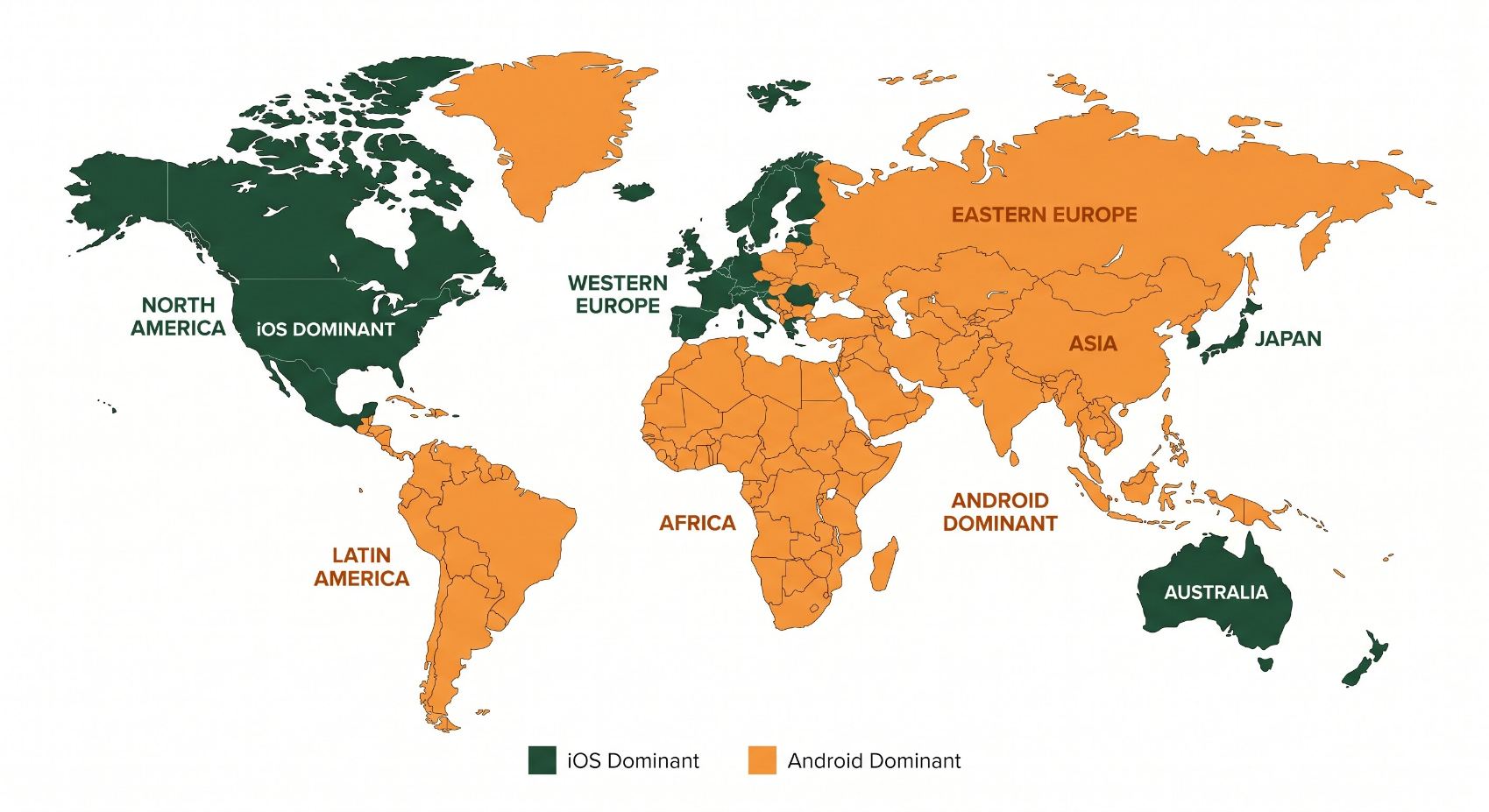
Platform dominance is heavily geographic. iOS leads in North America, Western Europe, Japan, and Australia. Android dominates globally by volume, particularly across Asia, Africa, and Latin America. Your audience’s location matters more than global market share figures.
How the Platforms Differ: What Matters to a Business Owner
| Factor | iOS (Apple) | Android (Google) |
|---|---|---|
| Primary audience (US) | 58 to 59% of US smartphone users. Higher income brackets, stronger in urban markets. | 41 to 42% of US smartphone users. Broader demographic spread, stronger in price-sensitive segments. |
| Revenue potential | Higher revenue per user. iOS users account for 68% of global app spending despite fewer users. | Higher download volume. Better for ad-supported or high-volume, lower-spend models. |
| Development cost | Generally lower initial cost. Fewer devices to test against due to Apple controlling all hardware. | Higher testing burden. Thousands of device and OS version combinations require more QA investment. |
| Time to market | App Store review typically takes 1 to 3 days for new submissions, longer for initial releases. | Google Play review is faster, often within hours to 1 day. Quicker update cycles. |
| OS update adoption | 87% of compatible devices on latest iOS. Developers can build for current OS with confidence. | 24% on latest Android. Developers must support multiple older OS versions, adding complexity. |
| Design consistency | Apple enforces strict Human Interface Guidelines. Consistent look and feel across devices. | More design flexibility. Inconsistency across manufacturers and screen sizes requires more design work. |
| App store policies | Stricter approval process. Higher quality bar, but higher rejection risk and longer wait. | More permissive approval. Faster to publish but fewer guardrails on quality or content. |
| Hardware access | Limited API access by design. Privacy-focused restrictions on sensors, Bluetooth, and background processes. | Greater access to hardware and device features. More flexible for apps requiring deep hardware integration. |
| Global reach | Strong in wealthy developed markets. Limited reach in emerging economies. | Dominant globally. Best choice for apps targeting international or emerging market audiences. |
The Revenue Difference Explained
The revenue gap between platforms is one of the most important and most underappreciated differences for business owners. In the first half of 2025, iOS generated over $56 billion in consumer app spending globally compared to roughly $25 billion from Android, despite Android having nearly three times the number of users. The App Store’s revenue per install is approximately $2.12 compared to $0.85 on Google Play.
This gap exists because of who iOS users are and how they behave. Apple’s hardware costs more, which means iPhone owners skew toward higher income brackets. They are more accustomed to paying for apps, subscribing to services, and making in-app purchases. If your app’s business model depends on subscriptions, one-time purchases, or premium in-app features, iOS is the platform where that model will generate the most revenue per user, often by a significant margin.
This is why many app studios launch on iOS first, validate the revenue model and product-market fit, then expand to Android. The iOS launch acts as a proving ground. If the monetization works with an iOS user base that is predisposed to spending, the Android version is built with confidence rather than uncertainty.
The Development Cost Difference Explained
Android development typically costs more than iOS development for the same app scope, and the primary reason is device fragmentation. Apple makes every iPhone. There are a finite, manageable number of screen sizes and hardware configurations to test against. Google licenses Android to hundreds of manufacturers producing thousands of distinct device models, running different OS versions, with different screen sizes, processors, and hardware capabilities.
Testing an Android app thoroughly means accounting for that variety. More device configurations means more testing time, more bug fixing, and more QA cycles. A feature that works perfectly on a Samsung Galaxy may behave differently on a Motorola or an older OnePlus running a two-year-old version of Android. This is not a reason to avoid Android, but it is a cost that needs to be factored into the budget estimate upfront rather than discovered mid-project.
If a developer quotes you the same price for an iOS app and an Android app of equivalent scope, ask specifically how they are handling device fragmentation testing on the Android build. A properly scoped Android project will almost always cost more to test and quality-assure than the equivalent iOS project. A suspiciously equal quote usually means the Android testing is underfunded in the estimate.
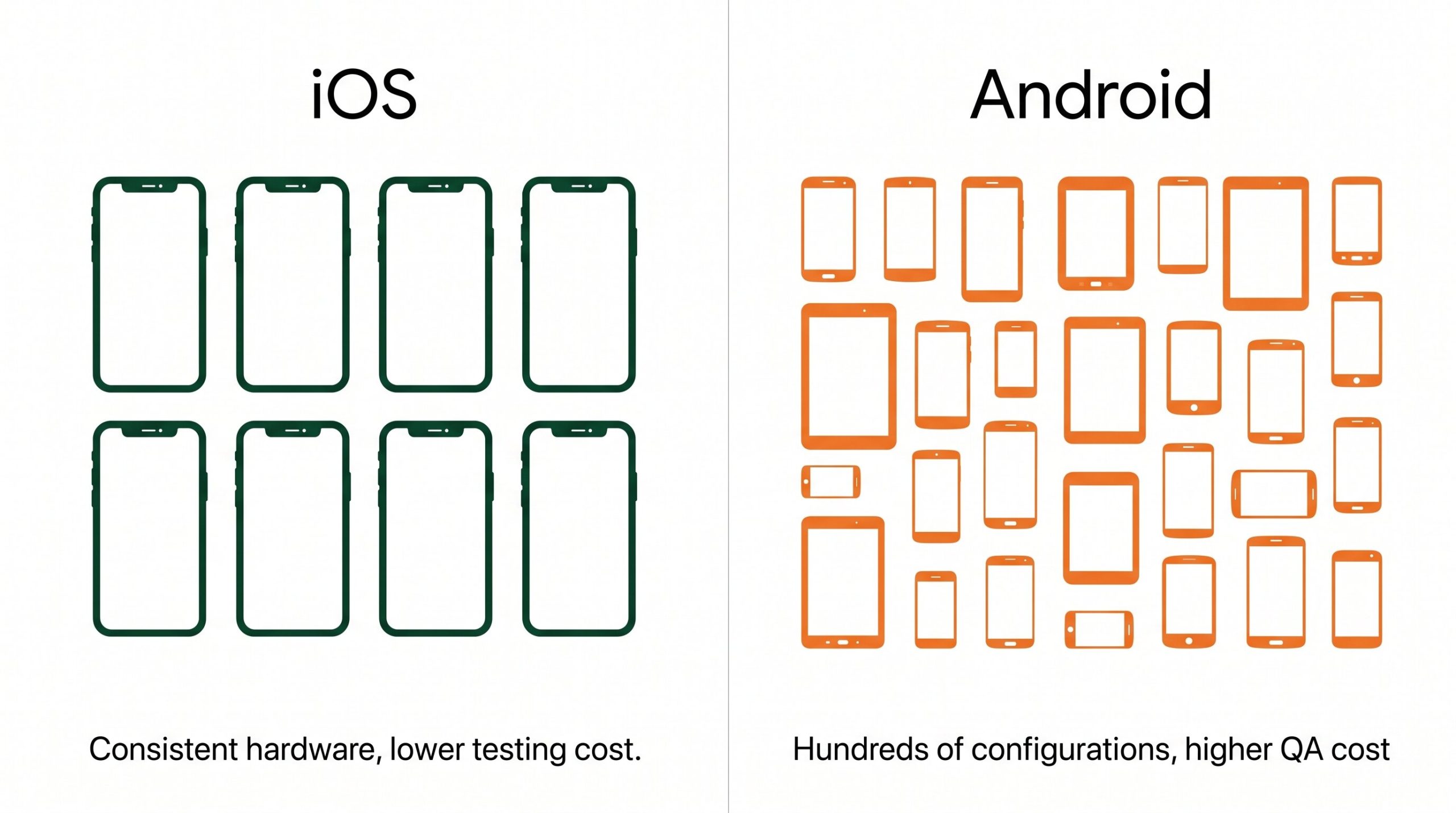
Device fragmentation is the primary driver of higher Android development costs. iOS developers test against a controlled set of Apple devices. Android developers must account for thousands of device and OS version combinations from dozens of manufacturers.
Which Platform Should Your Business Build First?
The answer depends on four factors: who your users are, how the app makes money, what your budget allows, and how quickly you need to be in market. Here are the most common scenarios and the platform that fits each one.
A Note on Cross-Platform Development
The native iOS versus Android comparison assumes you are building a platform-specific app. But it is worth understanding that a third path exists and is increasingly practical: cross-platform frameworks that build once and deploy to both.
Flutter (from Google) and React Native (from Meta) are the two dominant options. They allow developers to write a single codebase that runs on both iOS and Android, which reduces development time and cost significantly for apps that do not require deep native hardware access. For content-driven apps, service apps, booking systems, and most standard business apps, cross-platform performance is now close enough to native that the difference is imperceptible to the average user.
The cases where native still wins clearly are apps requiring complex animations with pixel-perfect performance, hardware-level integration (NFC, custom Bluetooth protocols, camera APIs), or features that need to use the very latest capabilities of each platform immediately after release. For everything else, cross-platform is worth a serious evaluation alongside native development as part of the scoping conversation.
Frequently Asked Questions
Is iOS or Android development more expensive?
iOS development is typically less expensive for an equivalent scope of app. The primary reason is device fragmentation on Android, which requires substantially more testing across a larger variety of hardware and OS versions. A properly scoped Android build will generally cost more to test and quality-assure than the equivalent iOS build. Cross-platform development using Flutter or React Native can reduce total cost significantly when building for both platforms simultaneously, though it comes with its own tradeoffs in native performance and access to platform-specific features.
How long does it take to build a mobile app?
A simple, well-scoped business app with a clear set of features typically takes three to six months from concept to App Store or Google Play submission. More complex apps with custom backend systems, third-party integrations, or advanced features can take six to twelve months or longer. Timeline is heavily influenced by how clearly the scope is defined before development begins. Poorly defined requirements are the most common cause of delays and budget overruns, not the complexity of the build itself.
Can I launch on both iOS and Android at the same time?
Yes, and cross-platform frameworks like Flutter and React Native make this increasingly practical. Simultaneous launch on both platforms is a reasonable choice when you have validated the product concept, have sufficient budget to cover both builds and testing, and your audience is genuinely split between platforms. For first-time app launches with tighter budgets, launching on the higher-priority platform first, validating the product-market fit and business model, then adding the second platform is generally the lower-risk approach.
Does the App Store or Google Play take a cut of app revenue?
Both platforms take a commission on in-app purchases and subscriptions. Apple’s App Store and Google Play both charge 30% on standard transactions, dropping to 15% for subscriptions after the first year on both platforms. Small developers generating under $1 million annually in app revenue qualify for Apple’s App Store Small Business Program and Google Play’s reduced service fee, both at 15%. These fees apply to digital goods and in-app purchases processed through the platform’s payment system. Physical goods and services fulfilled outside the app are generally exempt.
What happens if my app gets rejected from the App Store?
Apple’s review team will provide a reason for the rejection and a path to resolution. Most rejections are for specific guideline violations: missing privacy disclosures, insufficient testing coverage, broken functionality, or metadata issues. Rejections are common, particularly for first submissions, and should be treated as part of the process rather than a setback. Working with a development team that has experience with App Store submissions significantly reduces rejection risk because they build to Apple’s guidelines from the start rather than discovering violations at the review stage.
Ready to Build Your App But Not Sure Where to Start?
We help businesses scope and build custom mobile apps for iOS, Android, and both. The first conversation is always about understanding your audience and goals before we recommend anything technical. Let’s talk through your idea.
Start the Conversation