
If you have ever hired someone to build a website or spoken with a design agency, you have probably heard both terms used, sometimes in the same breath. UI and UX. UX and UI. Sometimes written together as UI/UX, as though they are the same thing. They are not the same thing, and understanding the difference is practical knowledge that affects every decision you make about your website, from how much you invest in design to what questions you ask your agency before signing a contract.
The short version: UX (user experience) is about how your website works and how easy it is to use. UI (user interface) is about how your website looks and how users interact with its visual elements. UX is the structure of a house. UI is the paint, the furniture, and the light fixtures. Both matter. But they solve different problems, and when one is missing or poorly executed, the other cannot compensate.
What UX Design Actually Means
User experience design is concerned with the entire journey a visitor takes through your website or app. That includes what they find when they arrive, how logically the content is organized, how many steps it takes to get from a landing page to a completed inquiry, and whether they leave feeling like the site helped them or left them frustrated.
UX is not a visual discipline. A UX designer is not primarily making things look good. They are making decisions about structure, flow, and logic, asking: what does this person need to accomplish, and what is the shortest, least confusing path to get them there? Good design for user experience often goes completely unnoticed, which is the goal. When navigation is intuitive, when a form is simple, when information is exactly where you expect it to be, users do not think about the design at all. They just get what they came for.
The discipline draws from psychology, information architecture, usability research, and behavioral data. A UX designer typically works before any visual design begins, establishing the foundation that UI design will later build on.
What UX designers work on
- User research: understanding who visits the site, what they want, and where they get stuck
- Information architecture: organizing content into a logical hierarchy that matches how users think
- Wireframing: creating low-fidelity structural sketches of each page before visual design begins
- User flows: mapping the path a visitor takes from entry to conversion
- Usability testing: watching real users interact with a prototype to identify friction points
- Content strategy: defining what content goes where, and in what order
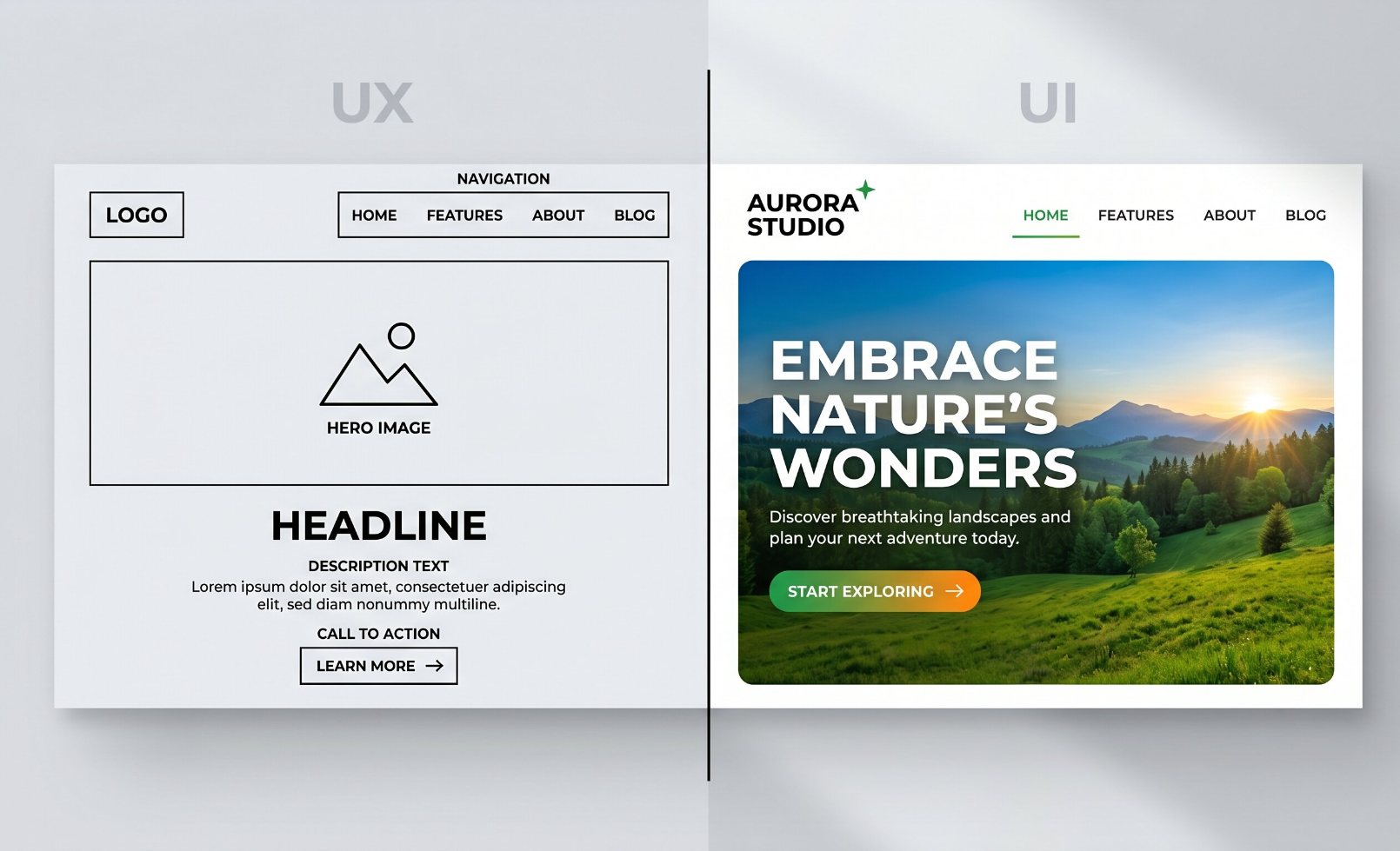
UX defines the structure. UI brings it to life visually. Both are necessary for a website that actually converts.
What UI Design Actually Means
User interface design is the visual layer that sits on top of the UX foundation. Once the structure and flow have been defined, UI designers decide how everything looks and feels. That means color choices, typography, button styles, spacing, icons, imagery, interactive states (what happens when you hover over a button or tap a menu), and how the brand identity is expressed across every screen.
UI design is what most people think of when they picture a website being designed. It is the work that produces the final visual output: the layouts that go to a developer for build, the design system that keeps every page consistent, the visual hierarchy that draws a user’s eye to the most important element on a page. Strong UI design creates an immediate emotional impression. It communicates whether a business is credible, modern, and trustworthy within the first few seconds of a visit.
This visual first impression matters more than many businesses realize. Research consistently shows that users form a judgment about a website in under a second, and that judgment directly influences whether they trust what they are reading. A visually weak or dated UI undermines credibility even when the underlying service is excellent.
What UI designers work on
- Visual design systems: color palettes, typography scales, spacing rules, and brand standards applied to the web
- Component design: the detailed visual treatment of buttons, forms, cards, navigation menus, and modals
- Responsive layout: ensuring the design holds together and remains usable across every screen size
- Interactive states: how elements behave visually when hovered, clicked, or focused
- Accessibility: sufficient color contrast, legible text sizes, and focus indicators for keyboard and screen reader users
- High-fidelity mockups: the finished design files handed to developers to build from
UI vs. UX: A Side-by-Side Comparison
UX Design
- Focus: structure, flow, and usability
- Goal: make the site easy and logical to use
- Happens: before visual design begins
- Tools: wireframes, user flows, prototypes, research
- Measured by: task completion, bounce rate, time-on-site, conversions
- Analogy: the blueprint and floor plan of a building
UI Design
- Focus: visuals, interaction, and brand expression
- Goal: make the site beautiful, consistent, and on-brand
- Happens: after UX structure is established
- Tools: design software (Figma, Adobe XD), style guides, mockups
- Measured by: visual consistency, accessibility scores, brand recall
- Analogy: the interior design, furniture, and finishes of a building
| Dimension | UX Design | UI Design |
|---|---|---|
| Primary question | Can users accomplish their goal? | Does this look and feel right? |
| Scope | The full user journey, on and off screen | The visual and interactive surface of the interface |
| Process order | Comes first — structure before visuals | Comes after — visuals applied to structure |
| Outputs | Wireframes, sitemaps, user flows, prototypes | Mockups, design systems, component libraries |
| Applies to | Websites, apps, physical products, services | Digital screens and interfaces only |
| Failure looks like | Users leaving because they could not find what they needed | Users leaving because the site felt untrustworthy or dated |
How UI and UX Work Together
The reason the two are so often paired, and so often confused, is that neither works well without the other. A website with excellent UX but poor UI might be logically structured and easy to navigate, but it will feel dated, unpolished, and untrustworthy. Users may never experience the good UX underneath because they left after the first impression.
A website with strong UI but weak UX is the more common problem for small businesses. The site looks beautiful. The branding is sharp. But users cannot find the service they came for, the contact form requires too many fields, the mobile layout breaks the navigation, and calls-to-action are buried below the fold. The site looks like it should work, and it does not.
A useful analogy: imagine a restaurant with an immaculate dining room, elegant tableware, and a well-printed menu, but the tables are arranged so tightly that waitstaff cannot reach you, and no one can find the restrooms. Beautiful UI. Broken UX. Guests leave early and do not come back.
The strongest websites treat UI and UX as a sequence, not a competition. UX establishes what needs to exist and in what order. UI decides how that content is presented. In practice, many web agencies combine both responsibilities, and the quality of your site depends heavily on whether the agency you hire approaches both disciplines with intention. This is exactly the kind of web design work that separates a site that looks good from one that actually drives leads.

When UX and UI are working together, users find what they need fast and the experience feels effortless.
Why This Matters If You Are a Business Owner, Not a Designer
You do not need to be a designer to make better decisions about your website. But understanding these two disciplines helps you ask the right questions, spot problems in a proposal, and understand why a site that cost a lot of money might still be underperforming.
When your site is not converting visitors into leads, the root cause is almost always a UX problem: content that does not match what the visitor expected to find, a contact form that is too long or buried too deep, a mobile layout that makes a phone number impossible to tap, or a service page that explains what you do but not why it matters to the person reading it.
When visitors do not trust your site quickly enough to stay and read, it is often a UI problem: a visual design that feels outdated, branding that looks inconsistent, a color scheme or typography that signals low credibility, or a layout that feels cluttered and hard to scan.
Most of the time, fixing one without addressing the other only partially solves the problem. A redesign that focuses only on making the site look better without rethinking the user flow will look different but underperform in the same ways. A UX audit that reorganizes content without refreshing the visual design may improve flow on paper while the bounce rate stays high because first impressions still fall flat.
What to Look for When You Hire a Web Design Agency
A web agency that takes both disciplines seriously will typically show you wireframes or structural sitemaps early in the process, before any visual design begins. They will ask questions about your customers: who they are, what they come to your site looking for, and what action you most want them to take. They will not jump straight to showing you color palettes and logo placements.
Questions worth asking before you hire:
- How do you approach UX before starting visual design?
- Do you create wireframes or user flow maps, and can I see examples?
- How do you decide where to place calls-to-action?
- How do you ensure the design works well on mobile?
- How do you test that the finished site is easy to use, not just visually appealing?
The same principles apply whether you are building a new website or developing a custom mobile app. The screen is different. The stakes of a broken UX and a weak UI are the same.
Understanding how user experience design impacts website performance is a useful next step once you have the foundation clear. The data behind UX decisions is more concrete than most business owners expect, and it shapes every recommendation a good agency will make.
Frequently Asked Questions
Can one person do both UI and UX design?
Yes, and many do, particularly in smaller agencies or on smaller projects. The job title “UI/UX designer” is common and typically refers to someone who handles both the structural and visual sides of a project. What matters is whether the person treats them as separate stages rather than one undifferentiated task. Rushing to visual design before the structure and flow are clear is a common source of expensive revisions later.
Which comes first, UI or UX?
UX always comes first in a well-run project. You define what the site needs to do, how it should be organized, and how users will move through it before you decide how any of it looks. Jumping straight to visual design without a UX foundation is one of the most common reasons websites look good but perform poorly. It also leads to costly revisions when structural problems are discovered late in the build.
Is UX only relevant for large websites or apps?
No. Even a five-page small business website has a UX that is either working for you or working against you. The question of where to place your phone number, how many fields your contact form has, whether your services are explained in terms your customers actually use, and whether your most important page is one click from the homepage are all UX decisions. They matter just as much on a simple brochure site as on a complex e-commerce platform.
What is the difference between UI design and graphic design?
Graphic design typically refers to static visual work: logos, print materials, brand identity assets, and marketing collateral. UI design applies visual principles specifically to interactive digital interfaces. A graphic designer understands layout and color, but UI design requires additional skills around responsive behavior, interactive states, accessibility standards, and how a design translates from a static file into functioning code. The skills overlap but the context and requirements are distinct.
How do I know if my current website has a UX or UI problem?
Look at your analytics. High bounce rates and low time-on-page often indicate a UX problem: visitors are not finding what they expected or cannot navigate effectively. Low conversion rates on pages with decent traffic typically point to UX issues in the flow or a mismatch between what the page promises and what the call-to-action asks. If visitors stay and read but still do not contact you, it may be a UI credibility issue or a UX issue with the conversion path specifically. A website audit can identify which is which.
Your Website Should Work as Well as It Looks
At The Valley List, every project starts with structure before visuals. We build sites that are easy for your visitors to use and designed to turn that traffic into leads. If your current site is not doing that, let’s find out why.
Get a Free Website Audit