
When someone lands on your website and it is slow to load, they do not think to themselves: “This is a technical issue, I will wait it out.” They leave. Most of the time they leave within the first three seconds, and most of the time they do not come back. They go to a competitor’s site, get what they need, and your business never enters the picture again. How fast your site loads is shaped by decisions made long before that visitor arrived, from how your site was designed and built to the infrastructure running underneath it.
That is not a worst-case scenario. It is the documented, consistently measured behavior of web users across billions of interactions. Load speed is not a back-end metric for developers to worry about. It is the first, and often only, impression your website makes on a potential customer. And unlike content or branding, it is largely determined by technical foundations most business owners never see, things like server quality, code efficiency, and how images are handled at the build stage.
This post focuses on what slow load times do to the user experience and your conversions specifically. If you want to understand how page speed connects to your search rankings, we have covered that angle separately. Here, the focus is on what users experience at each load threshold, how the damage accumulates across the full customer journey, and what is typically causing it.
How Users Perceive Load Time: The Three Thresholds
Usability researcher Jakob Nielsen identified three response-time thresholds that define how humans perceive waiting, and they have held up remarkably well since he first documented them. They provide a useful framework for understanding why even a few extra seconds of load time produces a disproportionate drop in engagement.
User Perception of Page Response Time
The critical insight here is that speed perception is not linear. A page that loads in four seconds does not feel twice as bad as one that loads in two seconds. It feels dramatically worse. The human brain is wired to interpret delays as a signal that something is wrong, and every second of waiting compounds that impression. By the time a page crosses the three-second mark, the user has already begun forming a negative judgment about the business behind it.
What the Data Actually Shows
These are not speculative estimates. The relationship between load speed and user behavior is one of the most thoroughly researched areas in web performance, with large-scale studies spanning retail, media, travel, and services industries all pointing to the same conclusion.
The business impact extends beyond conversions. A 1-second delay in load time produces an 11% drop in page views and a 16% decrease in customer satisfaction, both of which compound over time into reduced repeat visits, lower referral rates, and a weakened brand perception. Users remember how a site made them feel, and a frustrating load experience attaches itself to a business’s overall credibility in a way that takes time and effort to undo.
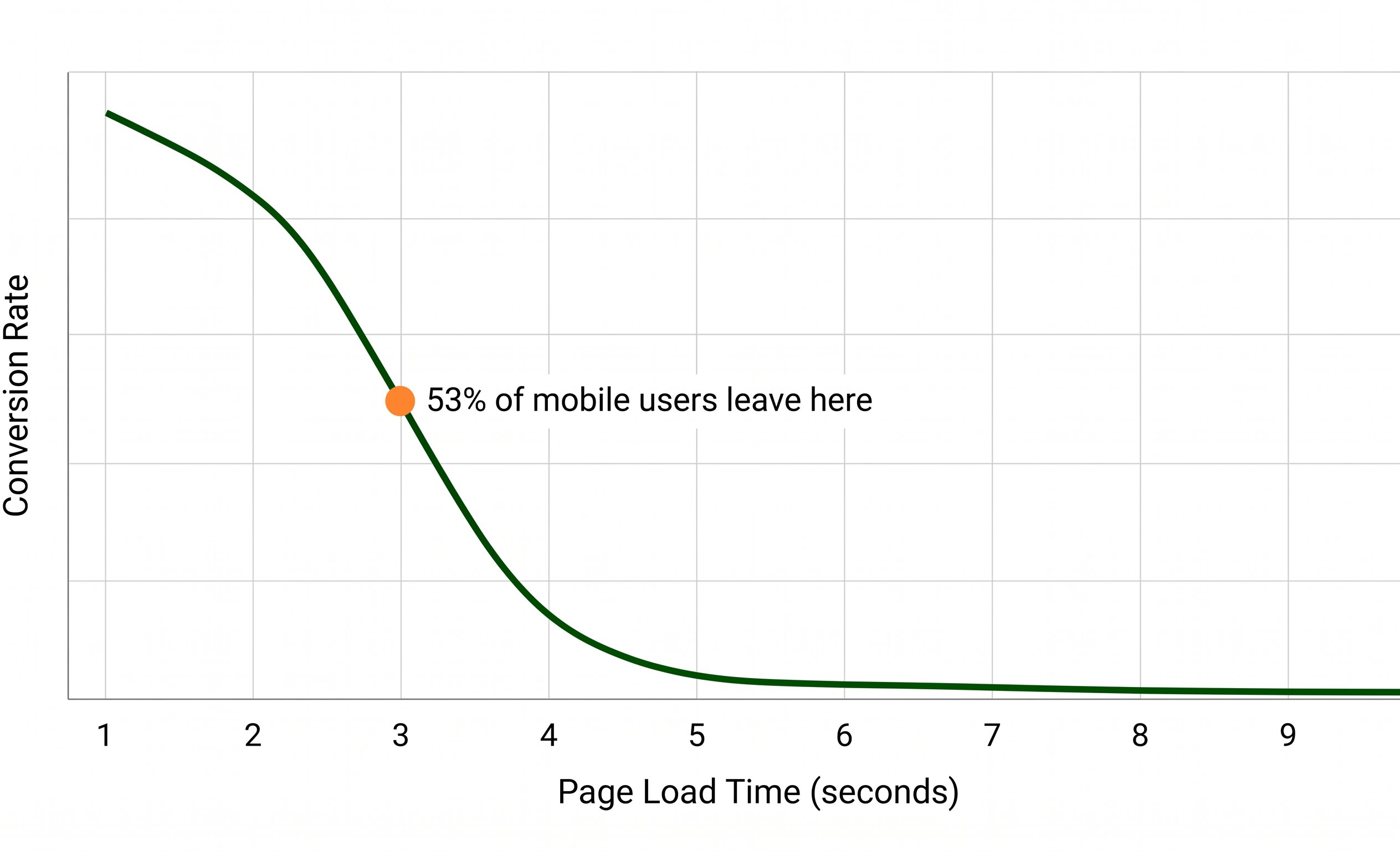
Conversion rates drop sharply as load time increases. The difference between 1 second and 5 seconds is not marginal — it is the difference between a site that converts and one that does not.
How Slow Load Speed Affects Every Stage of the User Journey
The impact of a slow website is not limited to the moment a page first loads. It ripples through the entire experience a visitor has with your site, affecting each stage from first arrival through to the decision to contact you, buy from you, or return later.
First Arrival and Bounce
The most immediate and measurable impact. A visitor who found your site through search, an ad, or a referral arrives and sees a blank page or a loading spinner. Most will leave within three seconds. This is not just a lost visit. If the visitor came from a paid ad, you paid for that click and received nothing. If they came from search and bounced immediately, that signal contributes to how search engines evaluate your page’s relevance and quality.
Engagement and Page Depth
Users who stay through the initial load are still affected if subsequent page transitions are slow. Clicking to a service page, a portfolio, or a pricing page and hitting another delay compounds frustration. Page depth, how many pages a visitor views in a session, drops significantly on slow sites. Fewer pages viewed means less exposure to your services, fewer trust signals absorbed, and a lower likelihood of taking any action.
Form Submission and Conversion
Even a visitor who navigates your site successfully and reaches a contact form can be lost at the final step if the form submission response is slow. Research consistently shows that slow form interactions lead to higher abandonment at the conversion point, often the most expensive place in the journey to lose a potential customer. A form that hesitates or takes multiple seconds to confirm submission creates doubt and erodes the confidence the rest of the site may have built.
Return Visits and Long-Term Trust
One of the less-cited findings from Google’s research is that the negative effect of a slow experience persists beyond the session itself. Users who experienced a site slowdown reduced their search and browsing activity even after the performance was restored, and took additional weeks to return to their previous behavior. A single slow visit can suppress a user’s willingness to re-engage with a site for weeks, even if the site is later fixed. Brand trust, once dented by a poor performance experience, recovers slowly.
Mobile Users Bear the Largest Cost
More than 60% of web traffic now comes from mobile devices, and mobile users are measurably less tolerant of slow load times than desktop users. The combination of variable network speeds, smaller screens with less visual buffer while loading, and the context in which mobile browsing happens (on the go, often with a specific immediate intent) means that slow mobile performance drives away exactly the users most likely to be in an active decision-making mindset.
Google moved to mobile-first indexing because of this shift, meaning the mobile version of your site is what gets evaluated for search rankings. But beyond rankings, the conversion data for mobile speed is compelling. Research from Google found that reducing mobile site load time by just one-tenth of a second produced an 8.4% increase in retail conversions and a 10.1% increase in travel conversions. These are not improvements from large-scale overhauls. They are the result of incremental speed gains that compound across every mobile visitor.
If your site has not been audited for mobile performance specifically, it is likely underperforming for the majority of your visitors. Desktop scores and mobile scores frequently differ significantly, and optimizing for desktop alone addresses only part of the problem.

Mobile users decide within seconds whether to stay or leave. Fast and slow are not equal experiences — they produce measurably different outcomes for your business.
The Hidden Cost: Slow Sites Waste Your Marketing Budget
This is the angle most discussions of web speed miss. When you run paid search or social advertising, every click costs money. A visitor who clicks your ad, lands on a slow page, and bounces in two seconds has still consumed your ad budget. You paid for that click. The slow site did not just fail to convert them. It erased the marketing investment that brought them there.
For businesses spending on Google Ads, Meta campaigns, or any form of paid traffic, site speed is not a separate technical concern. It is a direct multiplier on the return from every marketing dollar. A well-optimized site running on fast, reliable hosting extracts more value from the same ad spend. A slow one consistently underdelivers on a budget that was otherwise well-targeted.
The same logic applies to organic SEO. Getting a page to rank takes time and effort. If that page loads slowly and users bounce immediately, the ranking becomes less productive over time. Page speed and SEO are directly connected, but the mechanism that matters most is not just the algorithmic signal. It is the bounce behavior that tells search engines the page is not delivering a satisfying result for the query.
What Actually Makes a Website Slow
Understanding the cause is the starting point for fixing it. Most slow sites share one or more of the same root problems.
Many of these issues are maintenance problems, not design problems. A site that performed well at launch can become slow over time as plugins accumulate updates, images are uploaded without compression, and hosting environments age. Regular website maintenance catches and corrects these issues before they compound into a performance problem that affects real visitors.
How to Know If Your Site Has a Speed Problem Right Now
You do not need technical expertise to get a clear picture of where your site stands. Google’s free PageSpeed Insights tool gives you a performance score for both mobile and desktop, identifies the specific issues dragging your score down, and estimates the time savings from fixing each one. GTmetrix offers similar analysis with additional detail on how each element of your page contributes to total load time.
What you are looking for: a mobile score above 70 is a reasonable baseline for most small business sites. A score below 50 indicates meaningful performance problems that are likely already costing you visitors and conversions. Core Web Vitals scores, specifically Largest Contentful Paint (LCP), Interaction to Next Paint (INP), and Cumulative Layout Shift (CLS), give you the specific metrics Google uses to evaluate real-world page experience.
If your scores are low, the next step is identifying whether the problem is at the hosting level, the code level, or the content level, since each requires a different solution. A performance audit from a web team that knows what to look for is usually faster than trying to interpret technical reports without context.
Frequently Asked Questions
What is considered a good page load time in 2026?
For most business websites, a load time under 2.5 seconds on mobile is a reasonable target, with under 1.5 seconds being strong. Google’s Core Web Vitals specifically use Largest Contentful Paint (LCP) as the primary speed metric, with a score of 2.5 seconds or less considered “good.” The average load time among pages ranking on the first page of Google is around 1.65 seconds, which reflects how much weight fast performance carries in competitive search results.
Does website speed affect conversions even if bounce rate looks normal?
Yes, and this is an important nuance. A user who stays on your site despite slow load times is still forming a negative impression that affects whether they trust you enough to take action. Studies show that customer satisfaction scores drop meaningfully even for users who do not immediately bounce from a slow page. The friction of a slow experience colors the entire session, making users less likely to fill out a form, call, or complete a purchase even if they stayed long enough to see your content.
How does hosting quality affect load speed?
Hosting is the foundation of your site’s performance, and it is one of the factors that most business owners underinvest in. Shared hosting on a crowded server creates a variable performance environment where your site’s speed depends on what other sites on the same server are doing at any given moment. Managed hosting with dedicated resources, server-side caching, and a CDN removes that variability and sets a much higher performance floor. For most small and mid-sized business sites, upgrading hosting quality is the single highest-return performance investment available.
Can a site redesign fix speed problems, or does it require ongoing work?
Both, and the distinction matters. A redesign with performance as a priority can resolve structural issues: clean code, properly sized images, optimized scripts, and a solid hosting setup. But speed is not a one-time achievement. As content is added, plugins update, and hosting environments evolve, performance can degrade. The sites that maintain strong speed scores over time are the ones with active monitoring and regular maintenance to catch regressions before they affect real visitors.
Is a slow website a bigger problem for some industries than others?
The impact is universal, but the stakes vary. For e-commerce, the direct revenue correlation to load speed is well-documented and immediate. For service businesses and lead-generation sites, the cost is slightly more indirect but no less real. A potential client searching for a contractor, healthcare provider, or financial professional who hits a slow site is forming an opinion about the quality of your business in those first few seconds. In competitive local markets where several similar businesses appear in search results, speed is often the difference between earning the inquiry and losing it to a faster competitor.
Find Out What Your Site Speed Is Costing You
A free website audit from The Valley List covers performance, Core Web Vitals, hosting quality, and the specific issues holding your site back. No fluff, just a clear picture of what is happening and what to fix first.
Get Your Free Audit