If you have heard the term “headless CMS” and nodded along without being entirely sure what it means, you are not alone. It is one of those phrases that gets thrown around in web development conversations as though everyone knows it, but it rarely gets explained in plain terms that actually help a business owner decide whether it applies to them.
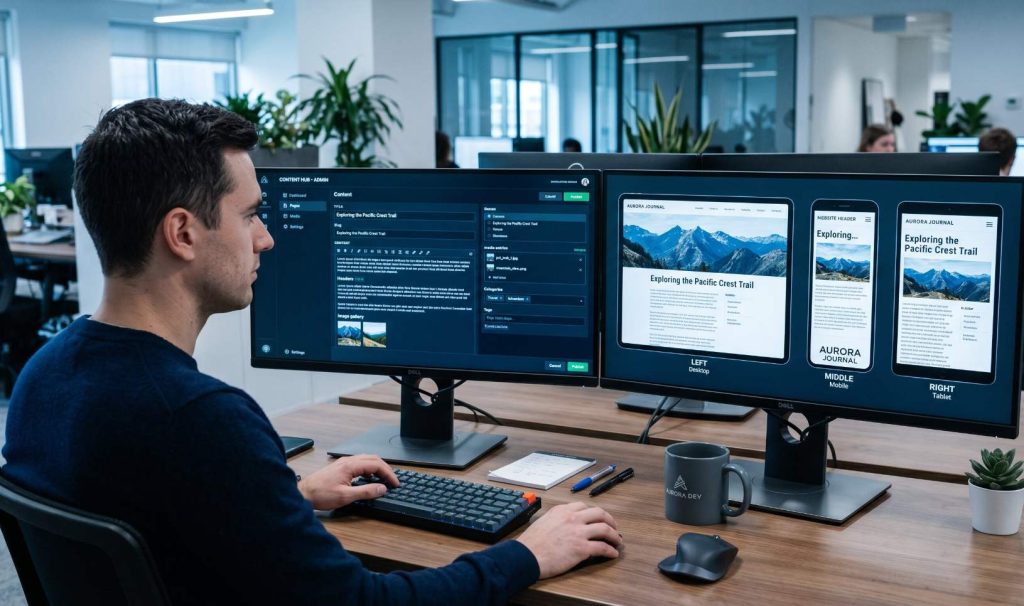
Here is the short version. A traditional CMS like WordPress bundles your content and your website presentation together in the same system. Change one, and you inevitably affect the other. A headless CMS separates those two things. Your content lives in one place and gets delivered anywhere you need it through an API, whether that is a website, a mobile app, a digital display, or whatever comes next. The “head” (the visual front end) is removed from the “body” (the content backend), hence the name.
That separation sounds simple, but it opens up a meaningful set of advantages for the right kind of project. This post covers what those advantages actually are, how headless compares to a traditional CMS, and honestly, when it makes sense and when it does not.
The Core Advantages of a Headless CMS
Faster Page Performance
Content is delivered via API to a separately optimized front end, allowing the use of static site generation and edge caching for significantly faster load times.
Omnichannel Content Delivery
The same content feeds your website, mobile app, and any other channel at once. Update it in one place and it changes everywhere simultaneously.
Developer Freedom
Developers can build the front end using whatever framework they prefer, React, Next.js, Vue, without being constrained by the CMS’s own templating system.
Stronger Security
Decoupling the content backend from the public-facing front end significantly reduces the attack surface. There is no exposed CMS admin panel tied to the live site.
Scales Without Rebuilding
Add new channels, front-end experiences, or regional sites without touching the content layer. Your content infrastructure grows with the business, not against it.
Future-Proof Architecture
When a better front-end technology emerges, you can swap it in without migrating all your content. Your content is not locked to a particular platform or rendering engine.
Breaking Down Each Advantage
1. Speed and Page Performance
Traditional CMS platforms like WordPress generate pages dynamically. When a visitor loads a page, the server queries a database, assembles the content, and renders the HTML in real time. With heavy plugins and a large content library, that process adds up to slower load times.
A headless CMS works differently. Because the front end is built separately, developers can use static site generation (SSG) or server-side rendering (SSR) with modern frameworks. Pages can be pre-built and served from a content delivery network (CDN) at the edge, meaning they load from a server physically close to the visitor. The result is dramatically faster load times, and page speed directly affects both search rankings and conversion rates.
2. Publish Once, Reach Every Channel
This is arguably the most practically valuable advantage for growing businesses. In a traditional CMS, your content is formatted specifically for web pages. If you want to push that same content to a mobile app, a kiosk, a voice interface, or a partner platform, you are either duplicating it or doing complex workarounds.
With a headless CMS, content is stored in a structured, channel-neutral format and delivered via API. That means a product description, a service page, or a blog post can be pulled into your website, your iOS app, and a third-party integration all from the same source. Update the content once, and every channel reflects the change. For businesses managing content across multiple platforms, this alone is a significant operational improvement.
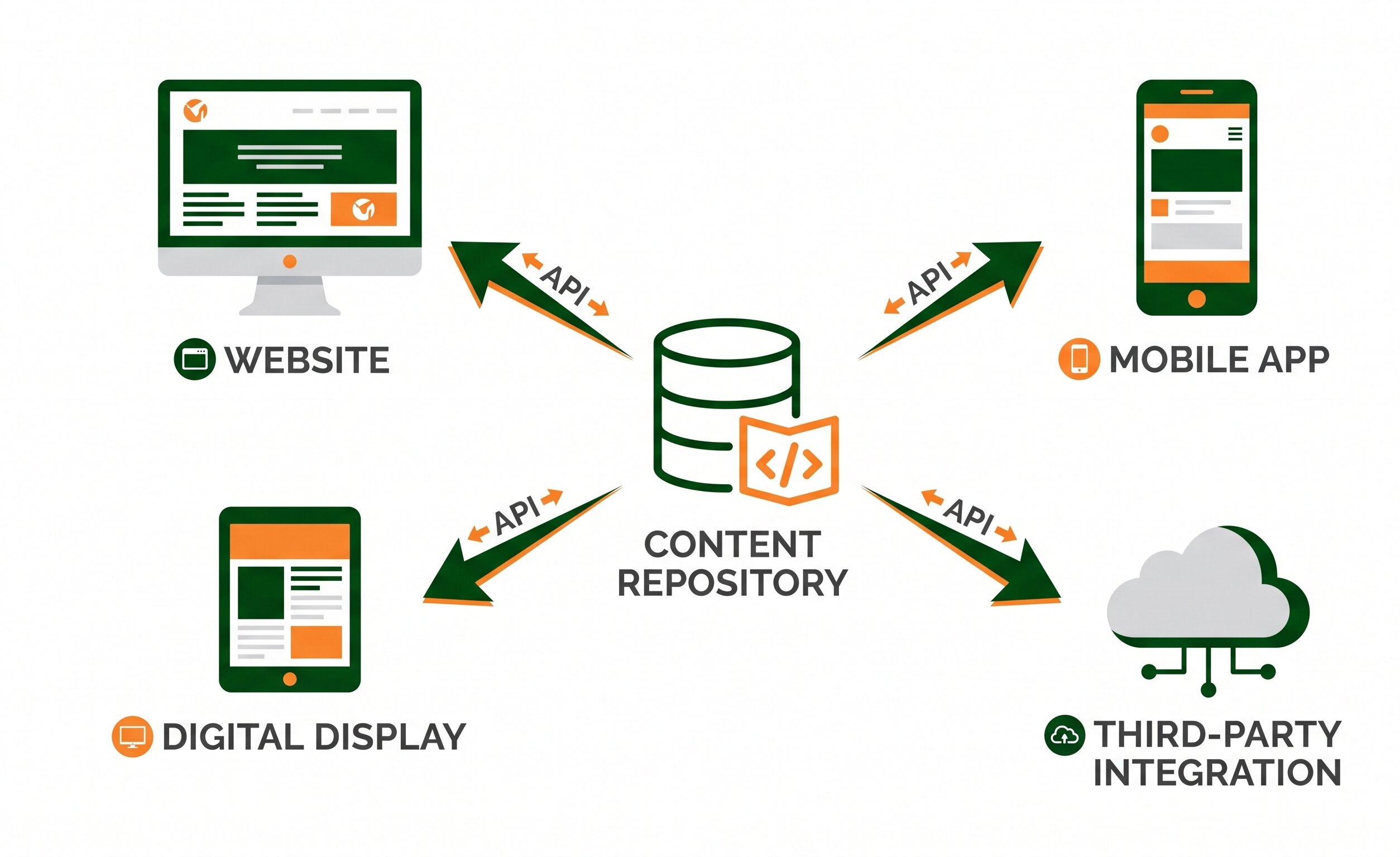
A headless CMS stores content once and delivers it to every channel through APIs, eliminating duplication and keeping everything in sync.
3. Front-End Freedom for Developers
In a traditional CMS, the front end is built within the constraints of the CMS’s own templating system. For WordPress, that means working within themes, page builders, and the block editor, each with their own limitations and performance implications.
A headless architecture removes those constraints entirely. Developers can build the front end using modern JavaScript frameworks like React, Next.js, or Vue without being forced to conform to the CMS’s structure. This makes it possible to build custom web development solutions that perform and behave exactly as the project requires, with no compromises forced by the underlying platform.
4. A Smaller Security Footprint
WordPress powers a large share of the web, which also makes it one of the most actively targeted platforms. The combination of a public-facing site, a login-accessible admin panel, and a large ecosystem of third-party plugins creates a significant attack surface. Outdated plugins remain one of the most common entry points for site compromises.
A headless CMS significantly reduces this exposure. Because the content management backend is completely decoupled from the public website, a vulnerability in one does not automatically compromise the other. The admin interface is not publicly accessible through the same domain as the front-end site. For businesses in healthcare, finance, legal services, or any field where data exposure carries serious consequences, this architecture difference matters.
In a traditional CMS, the same system that stores your content also powers the page visitors see. In a headless setup, those two things live apart. An attacker who finds a way into the front end does not automatically have access to the content backend, and vice versa.
5. Scalability Without a Full Rebuild
Growing businesses eventually outgrow their CMS. In a monolithic setup, that typically means a full migration, a process that is expensive, time-consuming, and disruptive. You are moving content, rebuilding templates, re-testing everything, and often migrating to a new hosting environment at the same time.
A headless architecture separates the concern of content management from the concern of content presentation. If you need a faster front end, you build a new one and connect it to the same API. If you expand into a new market and need a second front-end experience with different design and language, you add it without touching the content layer. The content infrastructure scales independently from the presentation layer, which keeps major changes manageable.
6. Front-End Technology Is Not a Permanent Decision
Technology stacks change. What is considered best practice for front-end development today will look dated in five years. In a traditional CMS, your content is deeply entangled with the presentation layer, which makes switching frameworks a substantial migration project.
With a headless CMS, the front end and the content repository are two separate systems. You can rebuild or replace the front end without touching the content. For businesses planning long-term digital investment, this architectural flexibility is a meaningful hedge against obsolescence.
Headless CMS vs. Traditional CMS: A Direct Comparison
| Factor | Traditional CMS (e.g. WordPress) | Headless CMS |
|---|---|---|
| Content and presentation | Tightly coupled in one system | Fully decoupled, connected via API |
| Page performance | Dynamic rendering, can be optimized but has limits | Static generation and edge delivery possible, faster baseline |
| Multi-channel delivery | Requires duplication or workarounds for non-web channels | Same content delivered to any channel from one source |
| Developer flexibility | Constrained by platform templates and tooling | Build the front end in any framework or language |
| Security exposure | Admin panel tied to the public site, plugin vulnerabilities | Backend not publicly accessible, smaller attack surface |
| Ease of use for editors | Familiar WYSIWYG editing, widely understood | Structured content editing, live preview requires extra setup |
| Initial cost and complexity | Lower, large ecosystem of ready-made themes and plugins | Higher, requires custom front-end build |
| Long-term scalability | Can become complex and slow at scale | Scales cleanly, content layer stays independent |

With the right headless setup, content editors can update and publish without needing developer support for every change.
When Headless Makes Sense (and When It Does Not)
Most articles about headless CMS are written by CMS vendors, so they tend to present headless as the obvious choice for everyone. That is not an honest assessment. The architecture has real advantages, but it also has real tradeoffs that matter depending on the size, budget, and goals of your project.
Headless is a strong fit when:
- Your content needs to appear on a website, mobile app, and other channels simultaneously
- Page performance is a top priority and a traditional CMS is a bottleneck
- You have or will hire developers comfortable with modern front-end frameworks
- The project is expected to scale significantly over time
- Security requirements are elevated (healthcare, finance, legal)
- You are building a custom web application with complex interactions
A traditional CMS may serve you better when:
- Your project is a standard business website with a limited budget
- Your team needs to manage and update content without developer support
- You need a fast launch with a lower upfront development cost
- You rely heavily on plugins and integrations that are native to WordPress or a similar platform
- Live content preview is a hard requirement for your editorial workflow
- The site scope is unlikely to expand beyond a single web channel
For most small business websites, a well-built WordPress site remains the practical choice. The headless advantage becomes most relevant when a project is genuinely multi-channel, has elevated performance requirements, or is expected to grow in complexity over time. If neither of those applies, the added development cost of a headless setup is hard to justify.
What This Means for Your Web Project
The decision between a headless CMS and a traditional CMS is not really a debate about which technology is better in the abstract. It is a question of what your specific project requires and what the realistic long-term roadmap looks like for your digital presence.
If you are a service business that needs a fast, credible website with a contact form, service pages, and a blog, a well-optimized WordPress build handled by an experienced team will outperform a rushed headless implementation at a fraction of the cost. If you are building something that spans web and mobile, serves content to multiple systems, or needs to scale to a size where a monolithic CMS becomes a genuine bottleneck, headless is worth the investment.
The conversation starts with an honest scoping of what you are actually building and where it is going. That is the kind of conversation we have at the start of every project. Whether your next build calls for a polished custom web design on WordPress or a fully decoupled architecture built for multi-platform delivery, the right architecture is the one that serves your users and your business goals without overbuilding for where you are right now.
Frequently Asked Questions
Is headless CMS the same as a static site?
Not exactly, though they are often used together. A headless CMS is a content management backend that delivers content via API. A static site is a front-end architecture where pages are pre-built rather than rendered on the fly. Many headless CMS setups use static site generators like Next.js or Gatsby to produce static pages fed by the CMS content, but headless can also power dynamic applications. The two concepts are compatible and commonly paired, but they are not the same thing.
Can non-technical users manage content in a headless CMS?
Yes, and this is one of the architecture’s underappreciated strengths. The content editing interface of a headless CMS is typically clean and structured, designed for writers and editors rather than developers. What non-technical users may miss compared to WordPress is WYSIWYG live preview: the ability to see exactly how a page will look while editing it. Some headless platforms have addressed this with visual preview tools, but it is worth factoring into your decision if real-time preview is important to your workflow.
Is a headless CMS more expensive to build and maintain?
The initial development cost is typically higher. Because there is no ready-made theme to apply, the front end must be built from scratch, which requires more developer time. The CMS platform itself may also carry a subscription cost if using a hosted service like Contentful or Sanity. That said, long-term maintenance can be lower in some cases: a simpler attack surface means fewer security incidents, and a decoupled front end is easier to update independently. The cost calculation depends heavily on the scale and complexity of the project.
What are the most commonly used headless CMS platforms?
Popular headless CMS options include Contentful, Sanity, Strapi, Prismic, and DatoCMS, each with different strengths around content modeling, developer experience, and pricing. WordPress itself can also be used in a headless configuration by using its REST API or GraphQL layer (WPGraphQL) to feed a custom front end, which gives teams familiar with WordPress content editing a path to headless architecture without fully abandoning the platform.
Does a headless CMS help with SEO?
Yes, in several meaningful ways. The performance improvements that come from static generation and edge delivery directly benefit Core Web Vitals scores, which are ranking signals in Google Search. Because developers control the front-end markup completely, implementing structured data, canonical tags, meta information, and crawlable URL structures is more straightforward than working within the constraints of a plugin-dependent traditional CMS. That said, SEO on a headless site still requires deliberate setup. The architecture provides the right conditions; a well-executed build takes advantage of them.
Not Sure Which Architecture Is Right for Your Project?
We scope every project honestly before recommending a technology stack. If headless fits, we will tell you. If it does not, we will tell you that too, and build something that performs exactly the way your business needs.
Talk to Our Team