
Your URL is the first thing a user sees before they decide whether to click your link in search results. It appears in Google before your title, before your meta description, and before a single word of your content. A clean, descriptive URL earns trust and clicks. A messy or generic one quietly costs them. URL structure is one of the foundational decisions in any serious SEO strategy, and unlike many SEO factors, getting it right costs nothing extra if it is handled correctly from the start.
This post covers exactly what makes a URL SEO-friendly, how to structure your site’s URL hierarchy, the specific mistakes that quietly damage your rankings and click-through rates, and what to do if your existing URLs need fixing without losing the authority you have already built.
Why URL Structure Matters for SEO and Users
Google has confirmed that URLs are a ranking signal, though a relatively lightweight one compared to content quality and backlinks. Where URLs have their strongest impact is on user behavior, specifically click-through rate and trust. A URL that clearly describes what a page contains performs better in search results because users are more likely to click something they understand before they arrive.
Clean URLs also make it easier for Google to crawl and understand your site. When your URL structure reflects your site architecture clearly, search engines can map the relationship between your pages more efficiently. That means better indexing, cleaner internal link equity distribution, and a stronger signal of topical relevance across your site as a whole.
There is also a practical shareability benefit. Short, readable URLs are shared more frequently on social media, copied correctly into emails, and remembered more easily. A URL that reads as plain English functions as a secondary headline for the page.
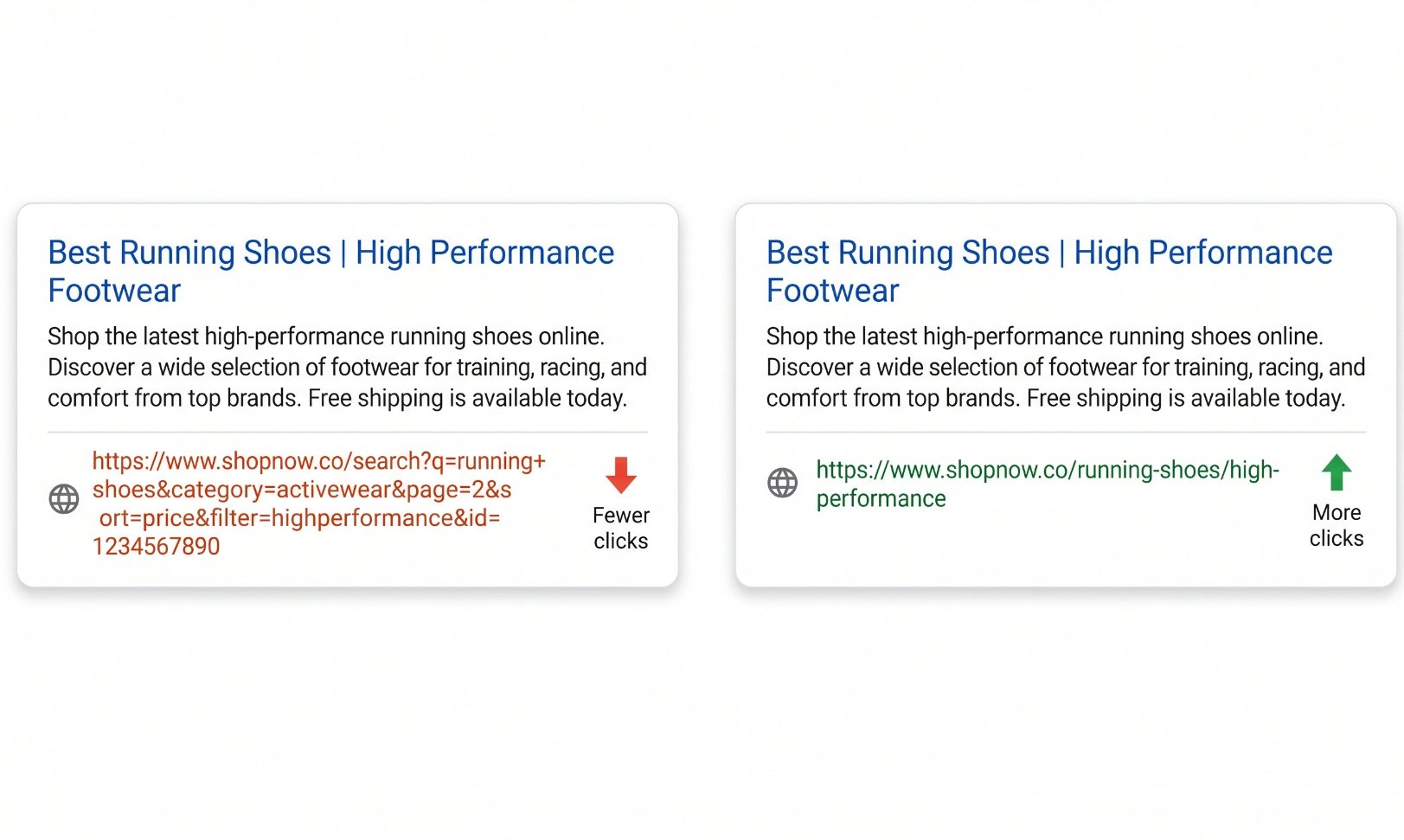
Users decide whether to click before they read your title or description. A clean URL builds immediate trust. A messy one raises doubt before the page has been seen.
What a Well-Structured URL Looks Like
Before getting into rules, it helps to see the difference in practice. These examples show the same page expressed as a poor URL and a clean one.
The Core Rules for SEO-Friendly URLs
Use hyphens, not underscores
Google reads hyphens as word separators. Underscores join words together, so “web_design” is read as one word: webdesign. Always use hyphens between words in your slugs.
Keep them short and descriptive
Research shows click-through rates drop by around 15% when URLs exceed 60 characters. Aim for slugs that describe the page in as few words as possible. Remove stop words like “the,” “a,” and “of” unless they are genuinely necessary.
Use lowercase only
Some servers treat /Services and /services as two different pages, which creates duplicate content issues and splits your ranking signals. Lowercase across every URL eliminates that risk entirely.
Include the primary keyword naturally
Your URL slug should reflect what the page is about. Include the main keyword once, at the start of the slug if possible. Do not repeat it or stuff multiple keywords in. One clear keyword per URL is the right approach.
Avoid dates in blog post URLs
Dating URLs (/2019/08/post-name) reduces click-through rate as content ages and creates redirection problems when you update older posts. Dateless URLs keep content evergreen and let you update and republish without changing the URL.
Use HTTPS
HTTPS is a confirmed ranking signal and a trust indicator that appears directly in the URL bar. Any site without SSL encryption in 2025 is at a disadvantage both with Google and with users who see the “not secure” browser warning.
Avoid dynamic parameters where possible
URLs like ?page=2&sort=price confuse crawlers and can generate duplicate content problems. Use static, descriptive URLs wherever the content warrants a distinct page. Parameter-heavy URLs are particularly common on e-commerce and CMS platforms where they require explicit cleanup.
Keep folder depth shallow
Aim for no more than two to three folder levels for most pages. Deep nesting (/services/category/sub-category/specific-service) reduces clarity for both users and crawlers and can dilute internal link equity as it flows down through multiple levels.
How to Structure Your Site’s URL Hierarchy
Individual URL rules matter, but the structure across your entire site matters just as much. Your URL hierarchy should mirror your site architecture: it should tell both users and Google where each page sits in relation to the others, and reinforce the topical relationships between your content.
For a service business, a clean hierarchy typically looks like this:
yoursite.com/services/ — services hub page
yoursite.com/services/web-design — individual service page
yoursite.com/blog/website-design-tips — supporting blog content
yoursite.com/contact — flat top-level for key standalone pages
Pages you want to rank highest should sit as close to the root domain as structurally appropriate. A homepage carries the most authority, and that authority flows down through internal links. A service page at /web-design receives more link equity than the same page buried at /company/our-services/web/design-services. Where you place a page in your URL hierarchy is a deliberate SEO decision, not a filing preference.
This is why URL structure and web design decisions are inseparable. The hierarchy established at build time shapes how authority flows across every page on your site for as long as the site exists. Changing it later is possible but carries real cost, as we cover below.
The Most Damaging URL Mistakes and What They Cost
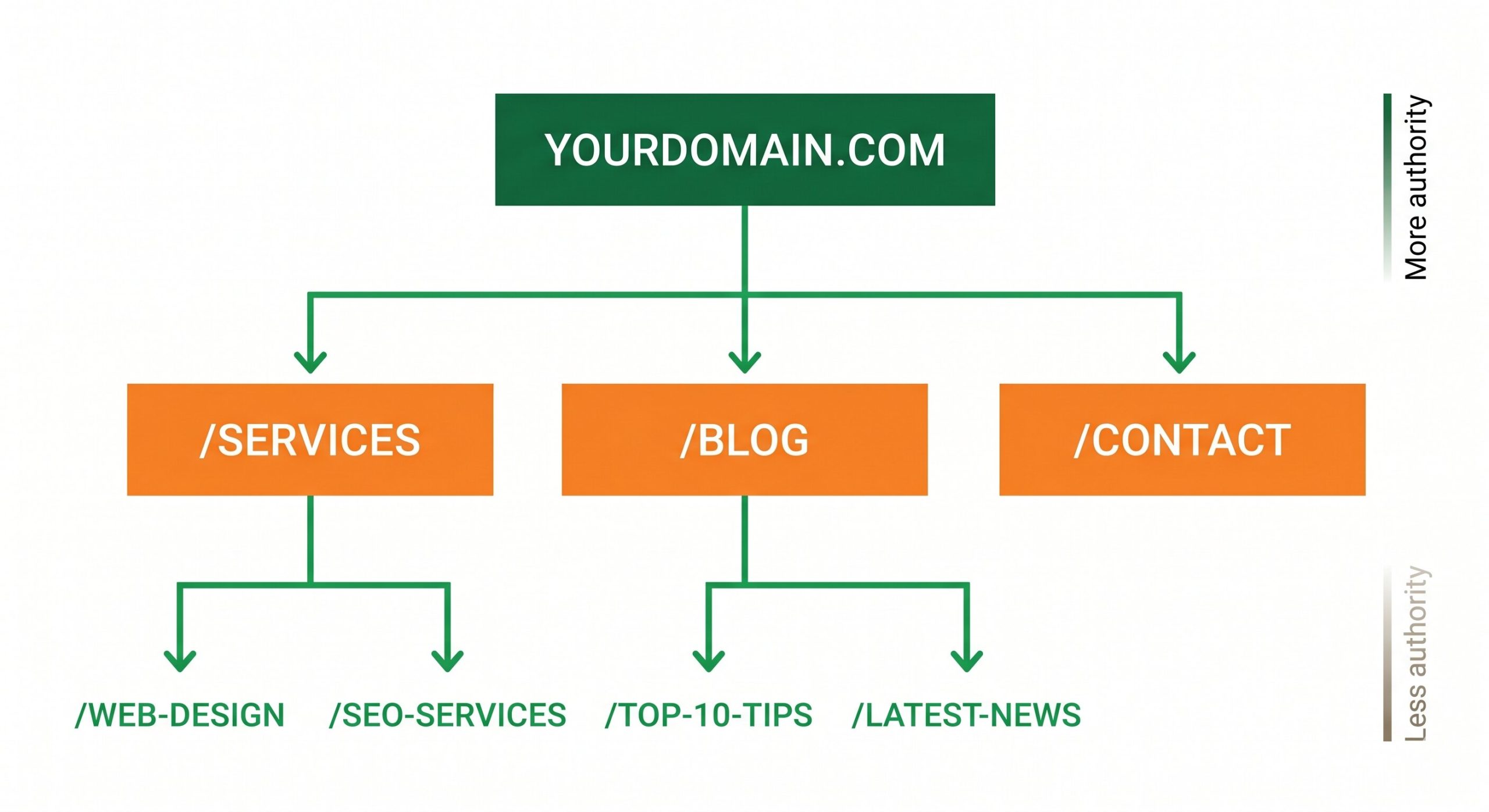
A logical URL hierarchy does more than organize your content. It shapes how authority flows from your homepage to your most important pages, which is a decision with real SEO consequences.
How to Audit and Fix Your Existing URL Structure
If your site already has URL problems, the fix is manageable but needs to be handled carefully to avoid losing ground in the process. Here is a practical sequence.
Start by crawling your site with a tool like Screaming Frog’s SEO Spider (free up to 500 URLs) to get a complete picture of your current URL structure, identify any duplicate content issues, find broken internal links, and flag overly long or poorly structured slugs. Export the list and sort by which pages receive the most organic traffic or have the most inbound links. Those are the highest-risk pages to change and need the most careful redirect planning.
For pages that need new URLs, set up 301 redirects from every old URL to its new version before making the change live. Update any internal links pointing to the old URLs across the site. Submit an updated sitemap in Google Search Console after changes are deployed. Monitor your organic traffic and crawl coverage report in Search Console over the following weeks to confirm Google has picked up the new structure correctly and that no redirect chains or errors were created in the process.
If your site has hundreds of pages or a complex CMS setup, URL restructuring is genuinely technical work. Poorly executed redirects, missed canonical tags, or partial migrations regularly cause traffic drops that take months to recover from. If you are not confident handling it yourself, it is worth getting a technical review before making changes rather than after.
Frequently Asked Questions
How much does URL structure actually affect Google rankings?
Google has confirmed URLs are a ranking factor but describes them as a relatively minor one compared to content quality, backlinks, and page experience signals. The more significant SEO impact of URL structure is indirect: clean URLs improve click-through rates from search results, which is a behavioral signal Google uses to evaluate page quality. Clean URLs also make your site easier to crawl efficiently and reduce the risk of duplicate content issues that can actively suppress rankings. Treat URL structure as a foundation to get right rather than a primary ranking lever to optimize aggressively.
Should I include the year in my blog post URLs?
No, and this applies to dates in general. Including a year or full date in a URL reduces click-through rate as the post ages, because users in search results can see that the content is old before they visit. A URL without a date lets you update and republish the post with a refreshed date in the content itself, without needing to change the URL or create a redirect. Dateless URLs keep your content evergreen and are the standard best practice for blog content intended to rank over an extended period.
Does the domain name itself affect SEO?
Exact match domains, where the domain itself contains the target keyword (like bestvacuumcleaner.com), used to carry a significant ranking advantage. Google has substantially reduced that advantage over time and it is no longer a meaningful strategy for new sites. Brand recognition, trust signals, and the authority built over time on a domain matter far more than whether the domain contains a keyword. Choosing a domain for brand clarity and memorability is a better long-term decision than optimizing the domain name for a keyword.
Should I use a trailing slash at the end of URLs?
Whether you use a trailing slash or not matters less than being consistent. The problem arises when both versions, /services and /services/, serve the same content without a canonical tag or redirect. Google may then treat them as two separate pages and split ranking signals between them. Pick one format for your site, enforce it consistently with server-level redirects, and use canonical tags to confirm the preferred version on any pages where both formats could be accessed.
If I change my URLs now, will I lose my current search rankings?
With proper 301 redirects in place, the ranking impact of a URL change is typically small and temporary. Google will re-crawl the old URLs, follow the redirects, and transfer the majority of the ranking signals to the new URLs. The key phrase is “proper 301 redirects.” Missing redirects, redirect chains (where one URL redirects to a second, which redirects to a third), or redirecting multiple distinct pages to a single generic URL will all cause real, lasting ranking loss. If your site has significant organic traffic, URL changes should be treated as a technical SEO project with careful planning and post-change monitoring, not a quick cleanup task.
Not Sure If Your URL Structure Is Hurting Your Rankings?
We audit sites for exactly these issues: duplicate content, poor URL hierarchy, missing redirects, and structural problems that quietly suppress organic traffic. A free audit gives you a clear picture of what to fix and what to leave alone.
Get a Free SEO Audit