
A high bounce rate feels like a clear signal that something is wrong with your website. In many cases it is. But before you start changing things, it is worth being honest about what bounce rate actually measures, because the number alone does not tell you why visitors are leaving, and chasing it in the wrong direction can make your site worse while the metric improves on paper.
Bounce rate measures the percentage of sessions where a visitor lands on a page and leaves without taking any action that registers as engagement. In Google Analytics 4, that means no clicks, no scrolling past a threshold, no conversions, no time on site beyond a few seconds. A high bounce rate on a contact page or a homepage almost always signals a real problem. A high bounce rate on a blog post where the visitor read the full article, got what they needed, and left is not the same problem at all. The goal of this post is to help you tell the difference, diagnose the actual cause on your specific pages, and fix the things that are genuinely costing you leads and customers.
If your bounce rate is high on pages that should be converting visitors into enquiries, the problem almost always comes back to how the page is designed and what experience it delivers in the first few seconds. We will get into that in detail below.
What Counts as a High Bounce Rate?
Bounce rate benchmarks vary significantly by page type, industry, and traffic source. Comparing your overall site bounce rate to a generic average is rarely useful. What matters more is how each type of page on your site compares to the expected behavior for that page type.
| Page Type | Expected Bounce Rate Range | When to Be Concerned |
|---|---|---|
| Homepage | 25% to 45% | Above 55%. Visitors are not engaging with what the site offers. |
| Service or product pages | 30% to 50% | Above 60%. Page is failing to move visitors toward action. |
| Contact or landing pages | 20% to 40% | Above 50%. Something is creating friction at the conversion point. |
| Blog posts and articles | 60% to 80% | Above 85% combined with very low time-on-page (under 30 seconds). |
| Paid ad landing pages | 30% to 50% | Above 60%. A mismatch between ad and page is burning your budget. |
Always look at bounce rate alongside average session duration and conversion data for the same page. A page with a 75% bounce rate and an average session of 4 minutes is performing well. A page with a 75% bounce rate and an average session of 8 seconds has a problem. The rate alone does not tell you which scenario you are in.
Diagnose Before You Fix
Most bounce rate advice skips this step and jumps straight to a list of generic improvements. That is why so many sites make changes without seeing results. Before you touch anything, identify which pages have the problem and look for patterns in where that traffic is coming from.
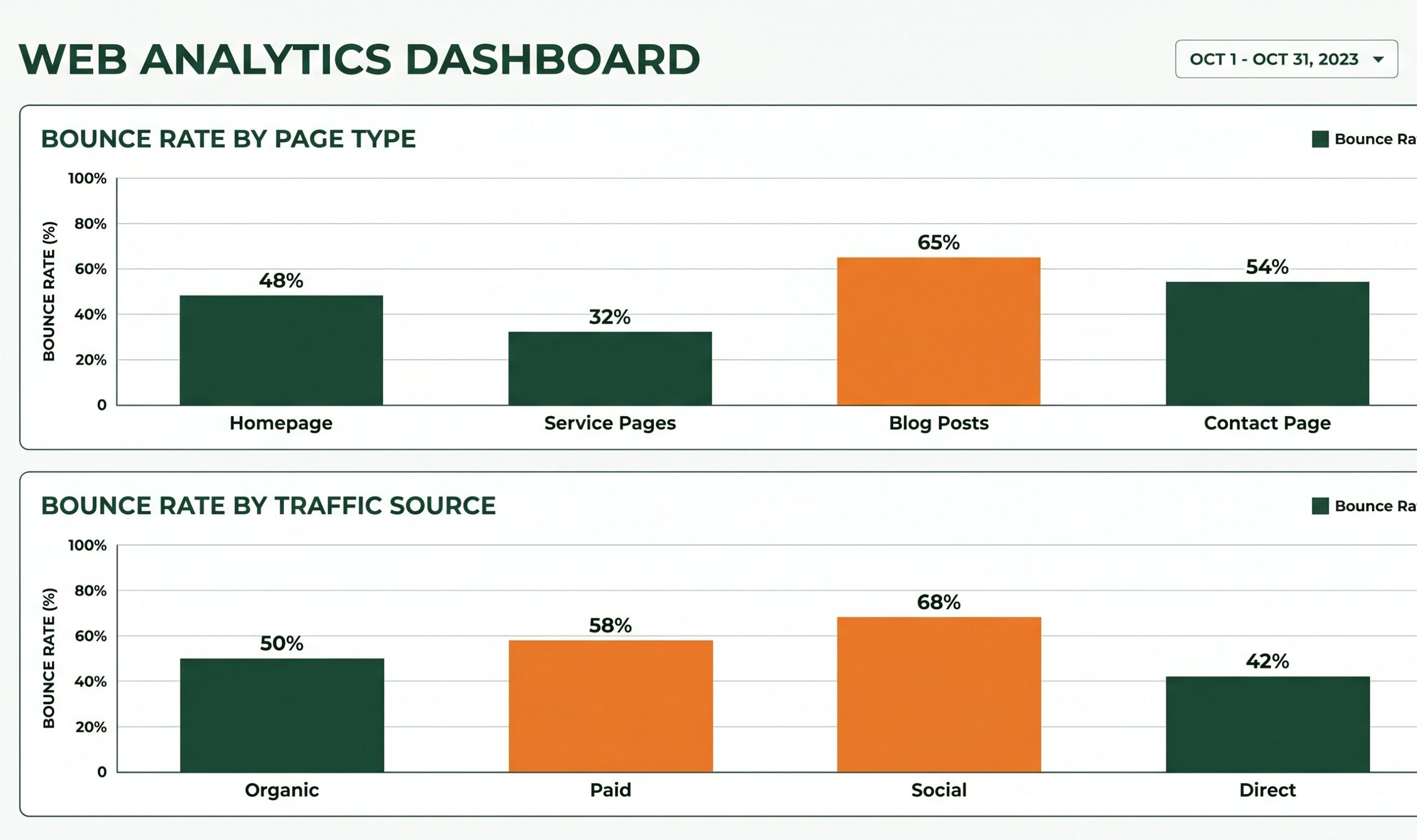
Bounce rate by individual page and traffic source tells you far more than a sitewide average. Diagnosing the pattern first is what determines which fix will actually move the number.
The Highest-Impact Fixes, in Order of Priority
Once you know which pages have a genuine problem and which traffic sources are contributing, work through these fixes in order. The ones at the top have the broadest impact and address the root causes most commonly behind a high bounce rate on business websites.
Fix the message match between where traffic comes from and what the page says
This is the most common and most overlooked cause of a high bounce rate. When a visitor clicks an ad, a search result, or a social post and lands on a page that does not immediately confirm it is the right place for what they were looking for, they leave. It takes under two seconds. The fix is not redesigning the page. It is making sure the headline, the first sentence, and the primary visual all directly reflect the promise that brought the visitor there. If your Google Ads campaign sends traffic to your homepage instead of a specific service page, that mismatch alone will produce high bounce rates no matter how good the page is.
Reduce page load time, especially on mobile
Speed is not a nice-to-have when it comes to bounce rate. Over half of mobile visitors leave a page that takes more than three seconds to load, and they leave before forming any opinion about the content or design. If your bounce rate is high and your load time is above three seconds on mobile, fixing speed will reduce your bounce rate faster than any content or design change. Start with image compression, check your hosting quality, and test the specific pages with the highest bounce rates through PageSpeed Insights to see what is slowing them down.
Improve the mobile experience of your highest-bounce pages
More than 60% of web traffic comes from mobile devices, and mobile visitors are less patient with friction than desktop users. If your page requires horizontal scrolling, uses text that is too small to read without zooming, has buttons that are too close together to tap accurately, or breaks the navigation on smaller screens, those visitors will leave regardless of how good the content is. Mobile UX issues are frequently invisible to business owners who check their own sites on desktop. Test your key pages on a real phone, not just a browser emulator.
Put a clear next step above the fold on every important page
Visitors who arrive on a page and cannot immediately see what they are supposed to do next will often leave rather than scroll to find out. Every page that you want visitors to engage with beyond the first glance needs a clear, visible call to action in the first screen without any scrolling required. That action should match the intent of the traffic arriving on that page. A service page should prompt an enquiry. A blog post should suggest a related resource or newsletter. A contact page should make the form or phone number the first thing visible.
Make the first 100 words of the page earn the visitor’s attention
On pages where content is the primary product, such as blog posts and resource pages, visitors decide within the first few sentences whether the page is going to be worth their time. If the opening paragraph is a vague introduction that takes three sentences to get to the point, visitors trained by years of reading online content will scroll quickly, find nothing immediately compelling, and leave. Lead with the most useful information. Answer the implied question in the headline before building context around it.
Add internal links that give visitors a logical next step
Internal links serve a dual purpose: they pass authority between pages for SEO purposes, and they give engaged visitors a path to continue rather than reaching a dead end on your page. On blog posts and service pages, link to the most relevant related content at points where a curious reader would naturally want to know more. The links should feel like a natural extension of what they just read, not a forced addition at the bottom of the page. A visitor who clicks through to a second page is no longer a bounce.
Remove or delay intrusive pop-ups
Pop-ups that appear within the first few seconds of a visit consistently increase bounce rates, particularly on mobile where they occupy the full screen and the close button is difficult to tap. If you use pop-ups for lead capture or announcements, delay them until the visitor has been on the page for at least 30 seconds or has scrolled past 50% of the content. A visitor who has already engaged with the page is far more likely to respond positively to an offer than one who just arrived and has not yet seen why the page is worth their time.
What a High Bounce Rate Costs Beyond the Metric Itself
The reason bounce rate deserves attention is not the number itself. It is what a high bounce rate represents in business terms: visitors who arrived, formed an impression, and left without becoming a customer, subscriber, or lead. Each of those sessions had a cost to acquire, whether through SEO effort, ad spend, or content production, and a high bounce rate represents the portion of that investment that produced nothing.
For paid traffic specifically, the cost of a high bounce rate is immediate and direct. If you are spending on Google Ads or social advertising and sending that traffic to pages with a 70% bounce rate, nearly three out of every four clicks you pay for produce nothing. Improving the landing page experience before scaling the budget is almost always the higher-return action. Spending more on traffic into a page that is leaking visitors is an expensive way to stay in place.
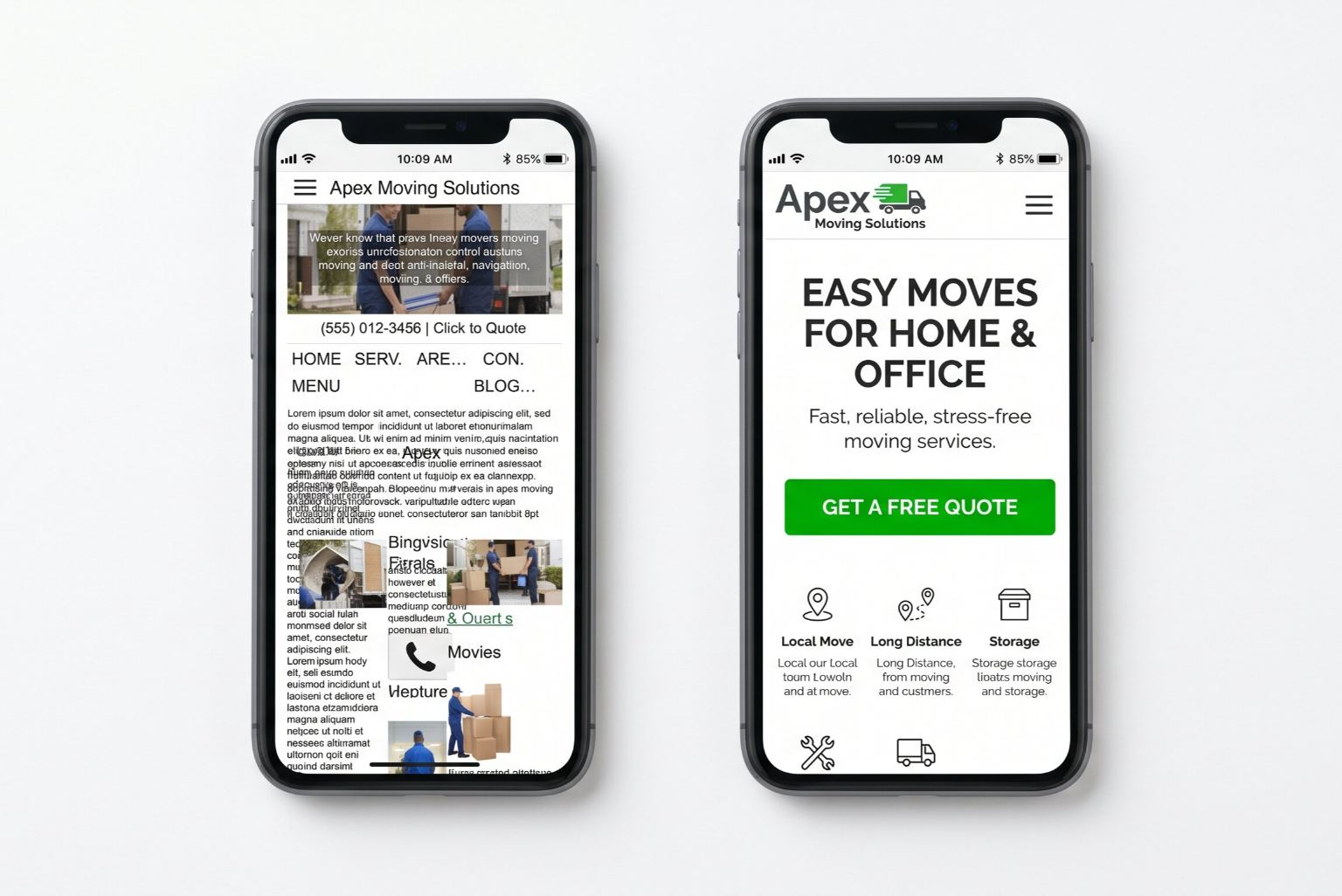
Mobile visitors decide in seconds whether to stay or leave. A clear, fast, well-structured mobile experience is one of the highest-return investments in reducing bounce rate on most business sites.
When Your Bounce Rate Problem Is Actually a Traffic Quality Problem
Not every high bounce rate is a page problem. If your analytics show that bounce rate from organic search is reasonable but bounce rate from a particular ad campaign or referral source is extremely high, the issue is targeting, not the page itself. Irrelevant traffic, visitors who clicked expecting something different from what the page delivers, will always bounce at a high rate regardless of how well the page is built.
This is worth auditing before investing in page redesigns. If a significant share of your traffic is arriving from sources that are poorly targeted, reducing that traffic or improving its targeting will improve your bounce rate more efficiently than changing the page. The goal is not a low bounce rate in absolute terms. It is a low bounce rate among the visitors you actually want to reach.
Check your Search Console queries report alongside your GA4 data. If your page is ranking for keywords that do not match what the page delivers, those visitors will bounce. Aligning your page content more precisely with the search intent behind your target keywords reduces bounce rate at the source, before a visitor even arrives.
Frequently Asked Questions
Does bounce rate affect SEO rankings?
Google has confirmed that bounce rate as reported in Google Analytics is not a direct ranking signal. However, the behaviors that produce a high bounce rate, slow load speed, poor mobile experience, content that does not match search intent, are all things Google measures through its own systems, including Core Web Vitals and user behavior signals from Chrome. Improving the factors that cause a high bounce rate will improve your search performance even if bounce rate itself is not in Google’s algorithm directly. The two are closely related in practice even if not mathematically linked.
What is the difference between bounce rate in GA4 and older versions of Google Analytics?
The definition changed significantly with GA4. In the older Universal Analytics, a bounce was any single-page session, regardless of how long the visitor stayed or how much they scrolled. In GA4, a session is only counted as a bounce if it is unengaged, meaning the visitor spent less than 10 seconds on the page, did not trigger a conversion event, and did not view a second page. This makes GA4 bounce rates generally lower than their UA equivalents for the same site and traffic. If your bounce rate appears to have dropped dramatically after switching to GA4, the definition change is likely the explanation rather than a genuine improvement.
Is a 70% bounce rate bad?
It depends entirely on the page type and what the visitor came to do. For a blog post where most visitors read the article and leave, 70% to 80% is entirely normal and does not indicate a problem. For a service page or a paid ad landing page designed to generate enquiries, a 70% bounce rate is a significant issue worth investigating. Always compare the bounce rate to session duration and conversion data for the same page before deciding whether the rate indicates a problem.
How long does it take to see results after making bounce rate improvements?
Technical changes like improving page speed can show results in GA4 data within days, as the metric updates with each new session. Content and design changes also take effect quickly once deployed. However, if the page’s bounce rate is heavily influenced by traffic quality or search intent mismatch, you may need to wait for content changes to work through the search index and attract different traffic before seeing meaningful improvement. Most meaningful improvements become visible in your analytics data within two to four weeks of implementation.
Should I use exit-intent pop-ups to reduce bounce rate?
Exit-intent pop-ups, which appear when the system detects the user is about to leave, can capture a small percentage of otherwise departing visitors, typically through an email opt-in or a special offer. They do not address the underlying reason the visitor was leaving and do not reduce bounce rate in a meaningful way for most business sites. On mobile, exit-intent detection is less reliable and the pop-up experience is often poor. If the goal is reducing bounce rate, fixing the page experience that causes visitors to want to leave is more effective than a pop-up that tries to intercept them on the way out.
High Bounce Rate? Let’s Find Out What’s Actually Causing It.
We audit your analytics, identify which pages and traffic sources are the real problem, and give you a clear picture of what to fix and in what order. No generic checklist, just a diagnosis specific to your site.
Get a Free Website Audit