
Yes, broken links affect SEO. But the honest answer is more specific than that, because not all broken links hurt you equally, and Google’s own guidance on this topic is more nuanced than most articles let on. Understanding the difference between the types that genuinely damage your rankings and the ones that are mostly a housekeeping issue will help you prioritize the right fixes rather than treating every 404 as an emergency.
The short version: broken internal links are the most damaging because they disrupt how Google crawls your site and how authority flows between your pages. Catching and fixing broken links is one of the core tasks of ongoing website maintenance, and sites that do not have a regular process for it accumulate problems quietly over time, often without the owner ever noticing until traffic starts to drop.
What Broken Links Actually Are
A broken link is any hyperlink that points to a destination that no longer exists or cannot be reached. When a user or a search engine crawler follows that link, they get an error instead of a page. The most common is a 404 error, meaning the server found the domain but the specific page does not exist. Other error types include 410 (page permanently deleted), 500 (server error), and redirect loops where a chain of redirects never reaches a valid destination.
Broken links fall into three distinct categories, and the SEO impact of each is different.
Broken internal links
High impactLinks within your own site pointing to pages that no longer exist. These block Google from crawling and indexing your content and disrupt the flow of link equity between your pages. The most damaging type for both SEO and user experience.
Broken inbound backlinks
High impactLinks from other websites pointing to pages on your site that no longer exist. You lose the link equity those external sites were passing to you. This is also a significant fix opportunity because the authority is being wasted rather than received.
Broken outbound links
Lower impactLinks from your site pointing to external pages that no longer exist. No direct SEO penalty, but they signal neglect to users and, at scale, can be a soft quality signal to Google. Worth fixing as a maintenance task but not an urgent ranking issue.
How Broken Links Hurt SEO: The Real Mechanisms
Google’s John Mueller has stated clearly that broken links are primarily a user experience issue rather than an SEO crisis. A handful of broken links on an otherwise well-maintained site is not going to cause ranking collapse. But that nuance should not be used as a reason to ignore them, because the indirect and cumulative effects are real and measurable.
They stop Google from finding and indexing your pages
Google’s own documentation states that the vast majority of new pages it discovers every day are found through links. When internal links are broken, Googlebot hits a dead end instead of following a path through your site. A page that has no working links pointing to it from elsewhere on your site may not get crawled at all, which means it will not appear in search results regardless of how good the content is. This is not a theoretical risk. Orphaned pages, ones that have become isolated because all the links to them are broken, are a genuine and common problem on sites that have been through redesigns, URL changes, or CMS migrations without a thorough redirect plan.
They drain link equity
Link equity, sometimes called link juice, is the authority value that flows from one page to another through hyperlinks. When you have a high-authority page linking to a page that no longer exists, that authority goes nowhere. It is wasted. On a site with strong backlinks from external sources pointing to 404 pages, the cumulative lost authority can be significant. Recovering it requires either recreating the missing pages or setting up 301 redirects so the authority flows to the closest relevant live page.
They damage user experience signals that Google measures
When a visitor clicks a link on your site and hits a 404 page, most of them leave immediately. That session produces a very short time-on-site, a high bounce signal, and no conversion. At scale, these behavioral signals affect how Google evaluates the overall quality of your site. A site that consistently delivers dead ends to its visitors will accumulate negative experience signals over time, particularly now that Google’s Core Web Vitals framework places explicit weight on real user experience data collected from actual visits.
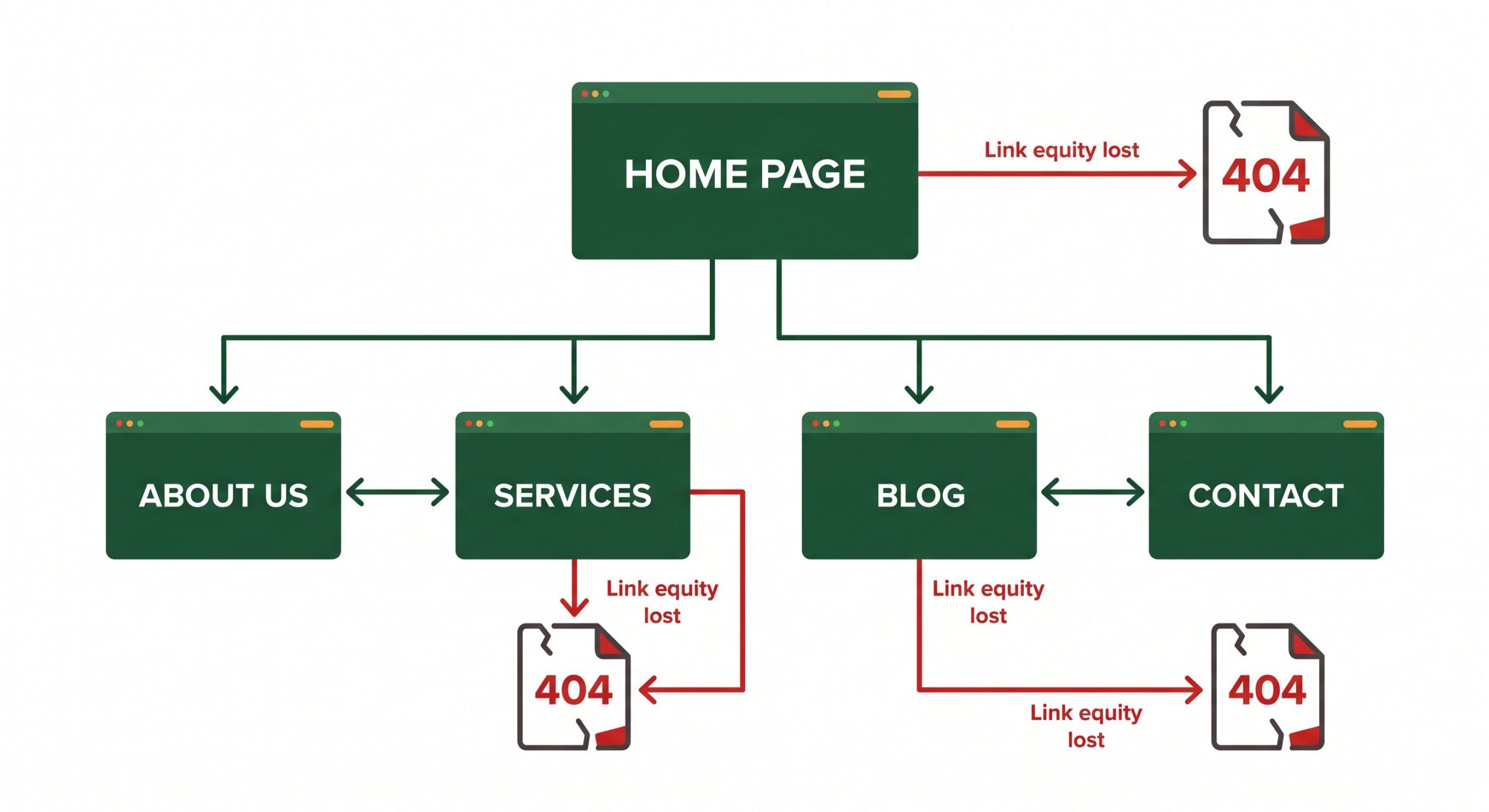
When internal links break, Google’s crawl path hits a dead end. Pages that can only be reached through broken links may never be indexed, regardless of their content quality.
They signal a neglected site
A site with a significant number of broken links signals to both users and search engines that it is not being actively maintained. This matters because Google’s quality evaluation systems consider site freshness, the presence of crawl errors, and overall technical health as part of how it assesses a domain’s authority and trustworthiness. A site riddled with 404 errors and broken outbound links to sources that no longer exist reads as one that has been abandoned, not one that deserves to rank at the top of competitive search results.
What Causes Broken Links
How to Find Broken Links on Your Site
You cannot fix what you cannot see. These are the most practical tools for identifying broken links across your site.
Google Search Console is the starting point for most sites. Navigate to Pages under the Indexing section and filter for “Not found (404).” This shows you which URLs Google has tried to crawl and found broken. The Coverage report also flags crawl errors across your site. This data reflects Google’s actual crawl experience, making it the most directly SEO-relevant source.
Screaming Frog SEO Spider crawls your entire site and returns a complete list of broken internal and external links, including which pages contain them. The free version handles up to 500 URLs, which covers most small business sites. For larger sites, the paid version is straightforward and relatively low cost.
For WordPress sites specifically, the Broken Link Checker plugin scans your content on a schedule and flags broken links directly in your dashboard. It is a lightweight ongoing monitoring tool rather than a deep audit tool, but it catches new broken links as they appear rather than requiring you to remember to run a manual crawl.
Search Console shows you what Google has already found. Screaming Frog shows you everything on your site right now. Use both. Search Console catches what matters most for rankings. Screaming Frog catches what Search Console has not yet crawled.
How to Fix Broken Links Correctly
Set up 301 redirects for deleted or moved pages
A 301 redirect permanently forwards both users and search engine crawlers from the old URL to a new one, preserving the majority of the link equity that was pointing to the old address. Always redirect to the most relevant live page, not to the homepage. Redirecting everything to the homepage is treated by Google as a “soft 404” and does not pass link equity effectively. On WordPress, plugins like Redirection handle this cleanly without requiring server-level access.
Update internal links to point to the correct live URL
For broken internal links caused by URL changes, update the links in your content to point directly to the correct live URL rather than relying on a redirect chain. Redirect chains, where one URL redirects to a second, which redirects to a third, dilute link equity at each hop and slow down crawling. A direct link is always cleaner than a redirect, so where the content is within your control, update the link source.
Recreate high-value deleted pages where appropriate
If a page that has been deleted had significant backlinks pointing to it, recreating the page at the same URL is the highest-value fix. You recover the full link equity from those backlinks without any redirect dilution. This is worth the effort when the deleted page had genuine inbound link authority. Use Ahrefs or Search Console’s Links report to identify which deleted pages still have external links pointing to them before deciding whether a redirect or a recreation makes more sense.
Remove or replace broken outbound links
For outbound links to external sources that no longer exist, either find an updated version of the source and update the link, replace it with an equivalent authoritative source, or remove the link entirely if no suitable replacement exists. Leaving links to dead external pages in your content does not help users and signals that the content has not been reviewed recently.
Make link auditing a scheduled maintenance task
Fixing broken links is not a one-time project. New broken links appear continuously as external sites change, as you update your own content, and as external backlinks point to pages that are later modified. A quarterly crawl with Screaming Frog combined with a monthly check of Search Console’s coverage report is a practical minimum for most business sites. Sites with large content libraries or active link building programs benefit from monthly crawls.
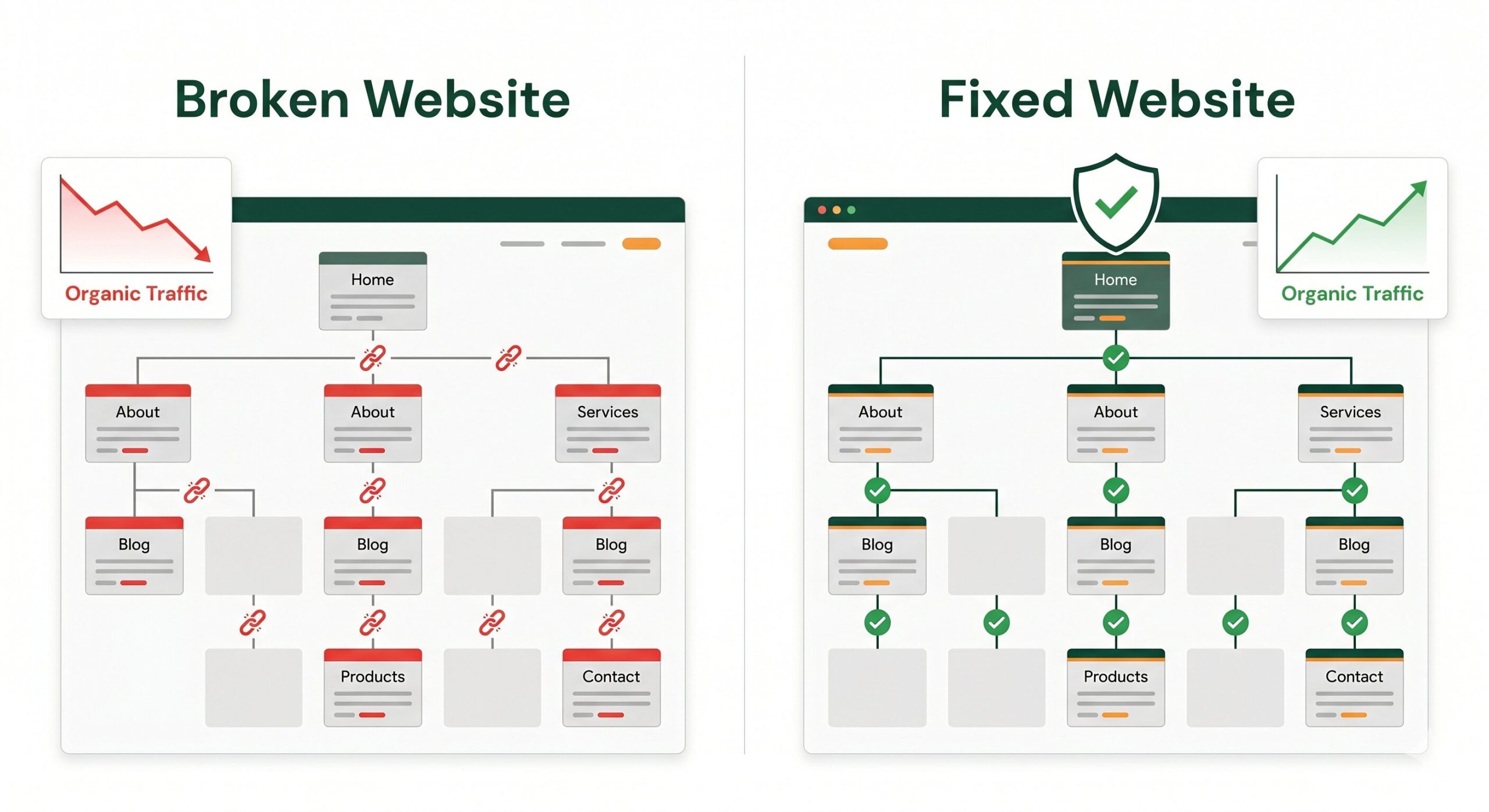
Broken links accumulate quietly. A site without a regular audit process can build up dozens of crawl errors and lost backlink equity without the owner ever being alerted, until rankings start to reflect it.
The Maintenance Angle: Why Broken Links Keep Coming Back
The reason broken links are a maintenance issue rather than a one-time fix is simple: the web changes constantly. External sources you link to move or disappear. Your own content gets updated, reorganized, or removed. New posts are published with internal links that contain typos. A site that was clean six months ago will have new broken links today, and that number grows with the size and age of the site.
This is why a professional website maintenance plan includes scheduled link auditing as a standard task, not an optional extra. Businesses that treat their website as a set-and-forget asset inevitably accumulate the kind of technical debt, broken links, outdated redirects, orphaned pages, that quietly erodes the organic visibility they worked to build. The fix is not complex, but it requires someone to actually do it on a regular schedule.
Sites that are actively maintained with regular link audits, redirect management, and content reviews consistently outperform equivalent sites that are left to run without attention. The gap is not always visible in the first few months. Over one to two years, the compounding effect of accumulated technical issues versus a clean, healthy site structure becomes significant in competitive search results.
Frequently Asked Questions
How many broken links does it take to hurt SEO?
There is no specific threshold. A handful of broken links on a large, well-maintained site is unlikely to produce measurable ranking impact on its own. The concern is cumulative and contextual. A site with dozens of broken internal links on its most important service pages, or one where a significant share of its inbound backlinks are pointing to 404 pages, will see real consequences. Google also considers the ratio of errors to total pages. A site where 20% of its crawled URLs return errors reads very differently to one where 0.5% do.
Does a 404 page hurt my domain authority?
A 404 response on a page that never had any links pointing to it and was not indexed by Google has essentially no impact. The SEO concern arises when a 404 page is one that previously ranked, had inbound backlinks, or has internal links pointing to it from other pages on your site. In those cases, the authority and equity that those links were passing is now going nowhere. Setting up a 301 redirect to the closest relevant live page recovers that value. A custom 404 page with helpful navigation is also worth having so users who do land on a broken URL have a way to continue rather than just bouncing.
Should I redirect all broken pages to my homepage?
No. Google explicitly treats bulk redirects to the homepage as “soft 404s” when the homepage is not a relevant destination for the original URL. A soft 404 is treated similarly to a real 404 in terms of link equity, meaning the redirect passes little to no authority. Always redirect to the most topically relevant live page. If no obvious equivalent exists, a relevant category or service page is better than the homepage. The homepage redirect should be a genuine last resort, not a default cleanup approach.
Can I use a plugin to automatically fix broken links on WordPress?
Plugins like Broken Link Checker can automatically identify broken links and alert you to them, which is genuinely useful for ongoing monitoring. Some plugins can automatically remove or replace broken links based on rules you set. However, automated fixes should be treated with caution. Automatically removing links or redirecting them without reviewing them individually can create new problems, particularly if the redirect target chosen by the plugin is not actually the most relevant page. Use plugins for detection and alerting, but make decisions about fixes manually.
What is the difference between a broken link and a redirect chain?
A broken link points to a URL that returns an error. A redirect chain is a sequence where URL A redirects to URL B, which redirects to URL C, which eventually reaches a live page. Redirect chains are not broken links in the strict sense, they do reach a destination, but they dilute link equity at each hop and slow down page loading. Google recommends keeping redirect chains to a single hop wherever possible. After a site migration or multiple rounds of URL changes, redirect chains are very common and worth cleaning up as part of a technical SEO audit.
Broken Links Accumulate Quietly. Let’s Find Yours.
A free website audit from The Valley List includes a full broken link report, redirect health check, and a clear list of what to fix first. No guesswork, just a concrete picture of what is affecting your site’s health and rankings.
Get a Free Site Audit